9 Best AI Agents for Social Media, Scored on What They Decide
Part of The 9 Best Social Media Automation Tools, Prices Checked
Hootsuite has the most mature agent features of the big platforms, and SchedPilot is the one to pick if you want your own assistant driving it through an API or MCP server. Most of the rest are schedulers with a caption button.
How we picked the best AI agents for social media
Every product on this page is sold as an AI agent. Most are schedulers with a caption button. The question worth asking is not how much AI is in the marketing, it is how much of the work the software decides, and what stands between that decision and your audience.
So we scored all nine on two things: where each sits on a four-level autonomy scale, and what an agent can actually call. Prices were read off each vendor’s own page in October 2026. Feature claims came from vendor documentation; where a claim lives only on a marketing page, it is written as what the vendor says rather than what the product does. For the wider market rather than the agent subset, the tools worth paying for ranks the same products on price and publishing.
What we did not do is run nine subscriptions for a month. One MCP server we called ourselves. One vendor’s site would not load at all, and its entry says so rather than quoting a number from elsewhere. SchedPilot, at number two, is our own product, and what that does and does not buy is on our editorial policy and disclosure page.
The autonomy scale we scored against
Four levels, each a different answer to one question: who decides?
- Level 1, suggests. It notices something and tells you. A metric moved, a competitor posted.
- Level 2, drafts. It writes the post or the reply and hands it over. Nothing leaves until you press send.
- Level 3, acts with approval. It decides, prepares and queues; a human releases it. The decision is the software’s, the veto yours.
- Level 4, acts alone. Nothing stands between the decision and your audience.
Level four does ship. It is always narrow: a keyword rule that hides a comment, an inbox agent trained on your own documents, a generator set to publish on a schedule. In every case a human pre-approved the behaviour, not the message. Nothing here looks at your week, decides what your brand should say, and says it.
Replies are where unattended autonomy gets expensive, and it is a policy problem before a quality one. X’s automation rules permit automated replies only inside a narrow consent exception: prior opt-in, one reply per interaction, an honoured opt-out, keyword-triggered replies barred outright. The same rules say AI reply bots need prior written and explicit approval from X. LinkedIn’s user agreement bars automated methods used to “create, comment on, like, share or re-share posts”. Meta’s spam policy is frequency-based rather than a flat ban, and reserves restrictions for lower frequencies when other signals of inauthenticity are present.
Pick your level before you pick a product: it sets the price bracket. Level three is the one most businesses should buy, and the design question it leaves you is where to put the human checkpoint. If the distinction still feels fuzzy, the difference between an agent and a scheduler is the long version of this section.
The comparison table
Entry price is the cheapest usable paid plan, at the billed-yearly rate where one is advertised. Four of these bill per user or per seat, so the headline is not your bill. The “agent can call” column is the one vendor roundups never check: a documented REST API or MCP server is what lets your assistant drive the tool rather than the reverse. That market has its own ranking, best MCP servers for social media.
| Tool | Autonomy | What it decides | Approval gate | Agent can call | Entry price |
|---|---|---|---|---|---|
| 1. Hootsuite | 3, with approval | Inbox routing and replies, timing | Review-and-approve, $399 tier | Wisdom AI only, in-app | $99 per user/mo |
| 2. SchedPilot | 3, with approval | Nothing alone; your assistant decides | Human approval before publish | MCP server, 8 tools, plus REST | $21/mo yearly |
| 3. eClincher | 3 and 4, inbox | Replies to messages and reviews | Automatic, or waits for approval | MCP server, 16 tools | $134/mo yearly |
| 4. Sprout Social | 2, drafts | What to surface: sentiment, spikes | It drafts, you send | Sprout API, $399 tier | $79 per seat/mo |
| 5. Agorapulse | 2, plus level 4 rules | What gets hidden, tagged, assigned | Rules fire unattended | Reports-only open API, Custom tier | $79 per user/mo |
| 6. Buffer | 2, drafts | Nothing. It suggests | Everything waits for you | API, 3,000 requests/mo free | $5 per channel/mo |
| 7. Metricool | 1, suggests | Nothing. It reports | Not applicable | Metricool MCP, free included | Free, then $20/mo |
| 8. Predis.ai | 2, plus level 4 posting | Concept, script, visuals, captions | Auto-posting is a setting | API on all plans | $19/mo, no posting |
| 9. Sintra | 2, as documented | Runs scheduled and triggered tasks | None documented | Integrations only | $15.60/mo, 12-month |
Two things fall out of that. The products that decide most are built around an inbox, because a reply has a clear trigger and a narrow range of correct answers. And three of the nine list an MCP endpoint your own assistant can call: SchedPilot, eClincher and Metricool.
01 Hootsuite
- Best for
- Teams where somebody other than you signs off, and the audit trail has to exist.
- Key strengths
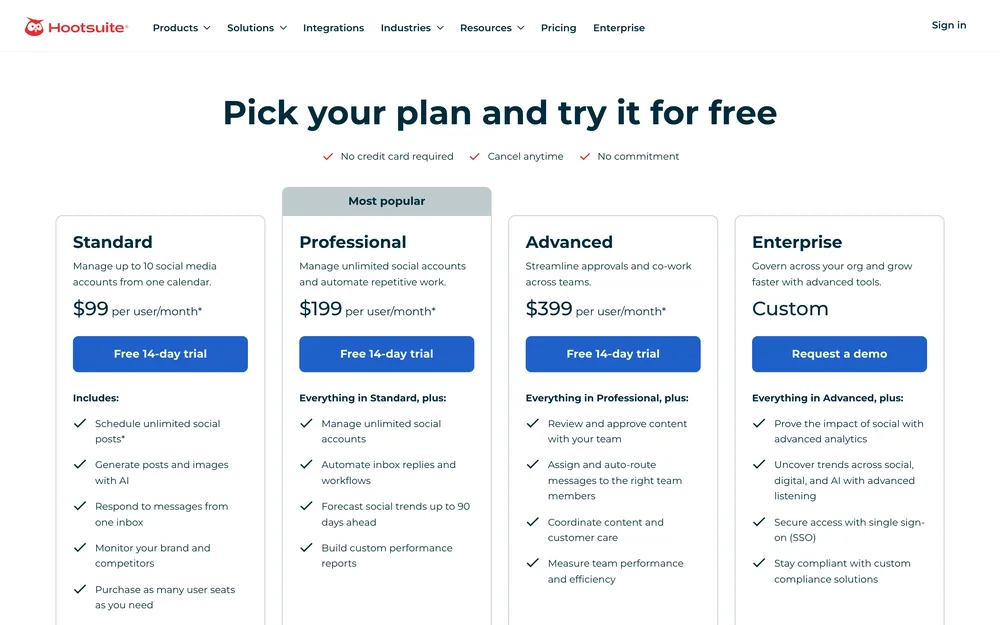
- Standard is $99 per user per month on annual billing with ten social accounts. Professional at $199 adds automated inbox replies and 90-day trend forecasting. Advanced at $399 carries the review-and-approve workflow and message auto-routing, the combination that makes level-three autonomy safe to switch on. Wisdom AI, which the plans page describes as an in-app assistant with MCP connectors, is listed on every plan. Pair it with automation workflows worth building before you turn anything loose.
- Biggest downside
- The approval gate costs $399 per user, so the feature that makes an agent responsible is the one gated highest: three people on Advanced is $1,197 a month. Wisdom AI is also Hootsuite’s assistant working inside Hootsuite, and the plans page documents no route for your own assistant to drive the platform from outside. The 14-day trial is throttled to 10 to 20 posts a day.
- Pricing
- Standard $99 per user per month, Professional $199, Advanced $399, all annual. Monthly billing costs more per user. Enterprise is quoted. pricing checked October 2026
- Verdict
- The most complete level-three product here, and the most expensive route to level three.
02 SchedPilot
- Best for
- People whose agent is already chosen, Claude or ChatGPT or something they wrote, and who now need it to reach nine networks.
- Key strengths
- The MCP server works. We connected to it and called it, and the eight tools it exposes are get_accounts, list_posts, create_post, upload_media, list_media, delete_post, get_analytics and create_linkedin_carousel. There is also a REST API with bearer-token auth from $21 a month, and SchedPilot holds the platform OAuth, so your assistant carries one key rather than nine developer apps. The site documents an explicit human approval step before publishing, and sixteen agent integrations have setup pages. For the wiring rather than the review, we have assistant setup, step by step.
- Biggest downside
- There is no free plan: a 7-day trial, card up front, charged $0 at the start. Team seats are effectively Enterprise-only, because only the $79 plan states a seat count. Its public documentation also contradicts itself: the API page describes a smaller, older tool set than the server we actually called, and the white-label page still carries placeholder text.
- Pricing
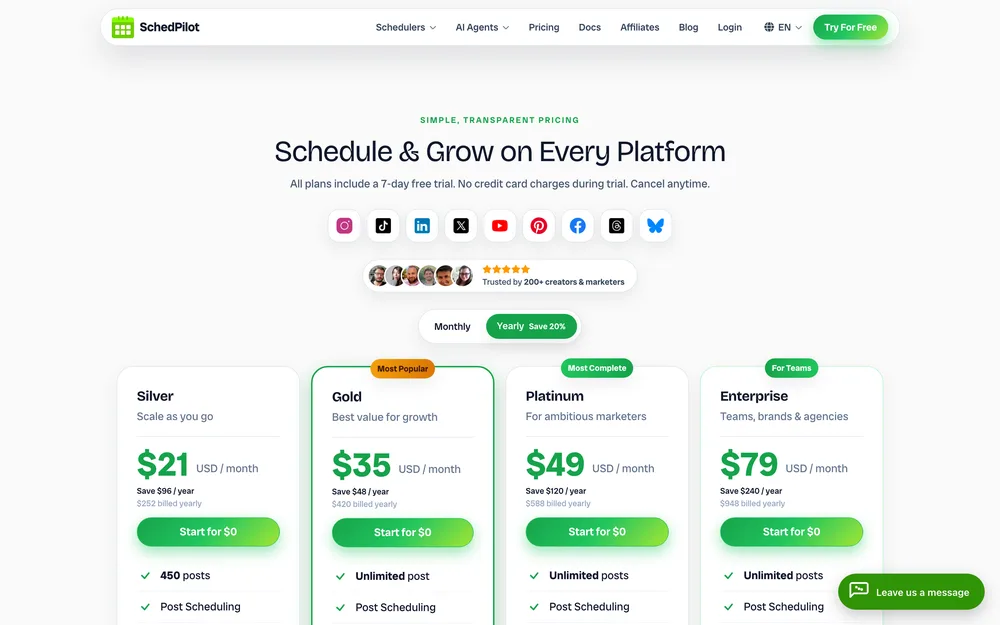
- Silver $21 billed yearly, $29 monthly, 5 accounts, 450 posts. Gold $35, 20 accounts, 300 AI credits. Platinum $49, 40 accounts. Enterprise $79, 100 accounts, 10 seats. Lifetime $299. pricing checked October 2026
- Verdict
- It is not the agent and does not pretend to be. It is the pair of hands the agent uses, and the cheapest competent pair here.
03 eClincher
- Best for
- Operations where the inbox is the work: reviews, listings, support questions needing an answer today.
- Key strengths
- The clearest example of acts-with-approval in the category, in its own words. Its homepage says AI agents “create and schedule posts, automatically reply to messages, comments and reviews, or wait for human approval”. The included Inbox Reply agent is rule-based: you set a condition, pick one of four actions, and it runs across every connected channel. Training it on your own FAQs, brand guidelines and product docs is a separate Advanced add-on, and so is deciding what happens when the agent is unsure. eClincher also ships a first-party MCP server: its page enumerates sixteen tools across eight networks that include Google Business Profile. A sane base for the messier Meta surfaces when you automate Facebook pages and groups.
- Biggest downside
- The auto-reply agent, the reason to buy this, appears only in the Enterprise column, and Enterprise is a quote. Auto-reply rules and approval workflows start at Professional, $314 a month billed annually; Standard at $134 is a single user with neither. The MCP page also says all users on your plan share the same API key, so there is no credential you can revoke for one agent alone.
- Pricing
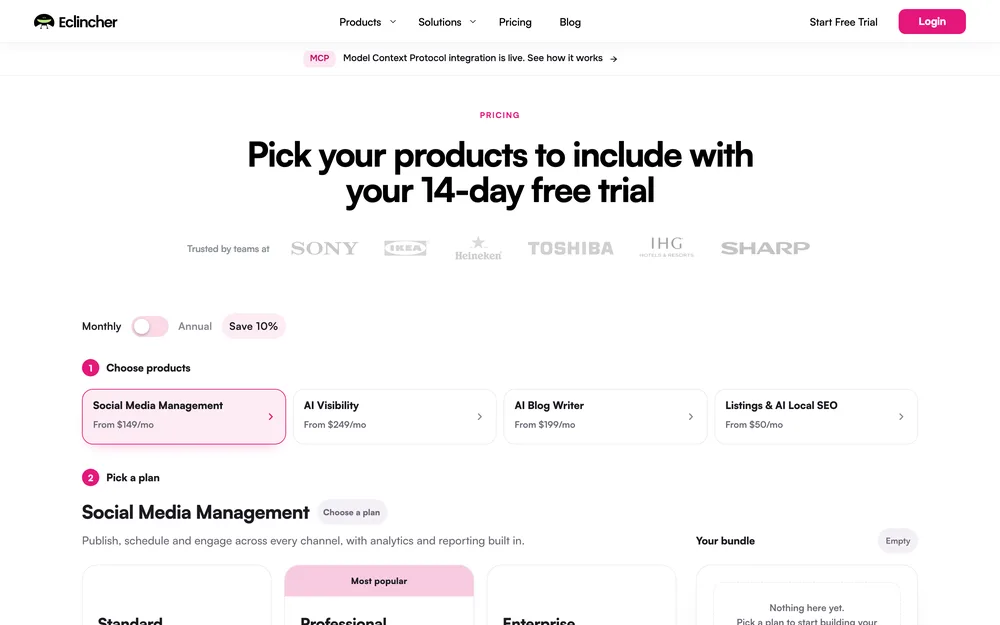
- Standard $149 a month, $134 billed annually, 15 profiles and 1 user. Professional $349 or $314, 25 profiles and 5 users. Enterprise custom. 14-day trial. pricing checked October 2026
- Verdict
- The most genuinely agentic inbox here, priced for companies already answering hundreds of messages a week.
04 Sprout Social
- Best for
- Teams whose decisions need informing by what the market is saying, not only by their own numbers.
- Key strengths
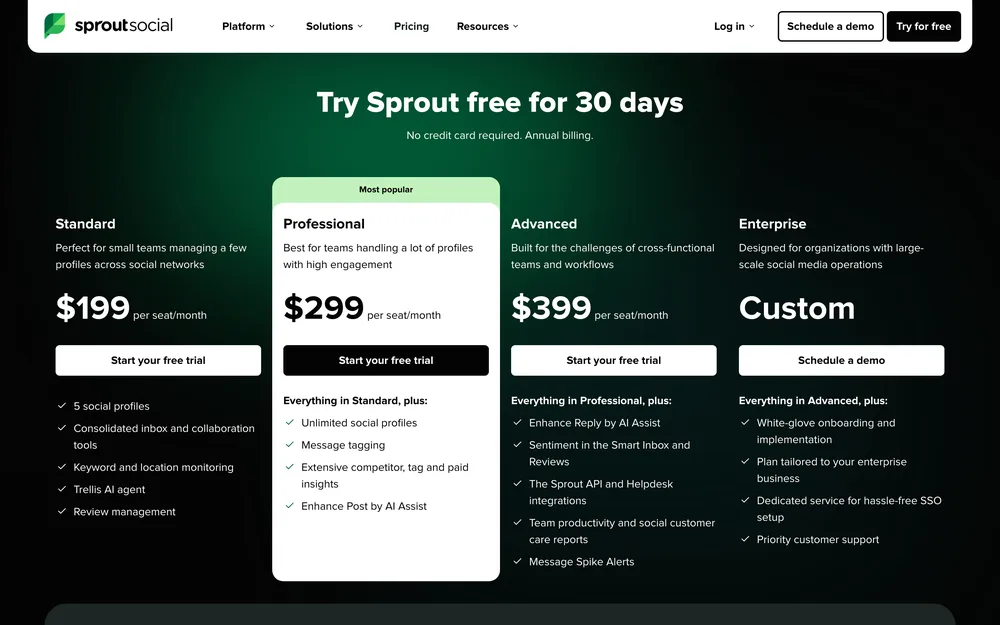
- An agent is only as good as what it can see, and this is the deepest field of view here. Essentials is $79 per seat per month billed yearly with five profiles. Advanced at $399 brings sentiment into the inbox, message spike alerts and the Sprout API. Every tier includes 100 AI agent credits per seat per month, and the trial runs 30 days with no card. Spike alerts are the most agent-like thing here: software noticing a change you would not have looked for. It is also the name clients recognise when you are running the multi-client operating model.
- Biggest downside
- For all that depth it decides almost nothing: it surfaces, scores and drafts, and a person acts. The API arrives only on Advanced at $399 per seat, and premium analytics and listening are separate paid add-ons on top. Standard at $199 a seat gives the same five profiles as Essentials at $79, so the extra $120 buys features rather than capacity.
- Pricing
- Essentials $79 per seat per month billed yearly, $99 monthly. Standard $199, Professional $299, Advanced $399 per seat. pricing checked October 2026
- Verdict
- Buy it for the eyes, not the hands. As an agent it is a very expensive level two.
05 Agorapulse
- Best for
- A small team drowning in comments who want the obvious items handled before they open the tab.
- Key strengths
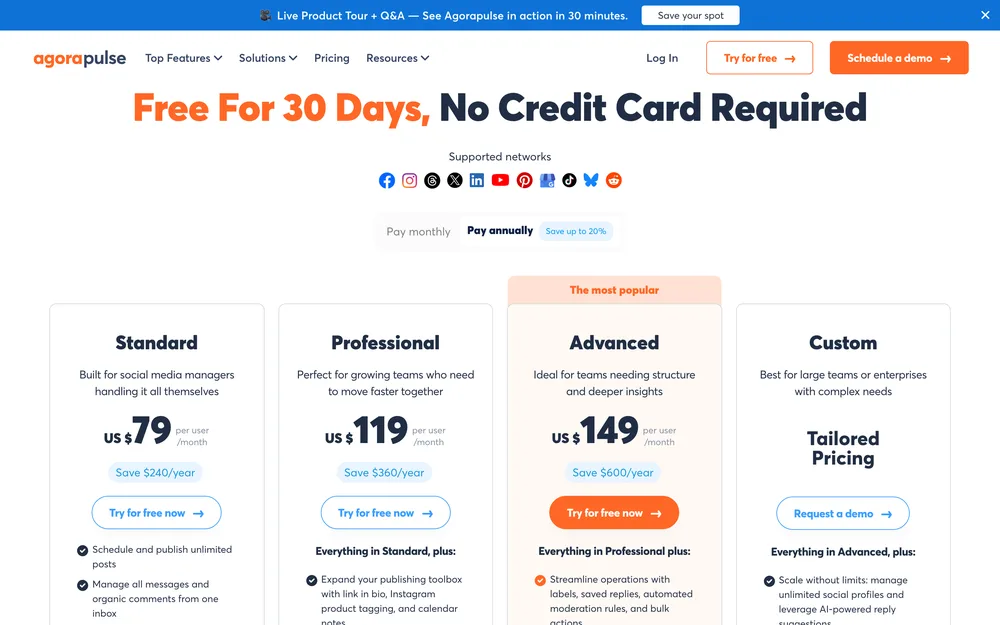
- Inbox triage is the agent job with the most obvious daily payoff, and this is the cheapest credible version. Automated moderation is listed on all four plans: rules that hide, tag, assign or raise a ticket when a condition matches, firing without you. An AI writing assistant, alt text generator and AI summaries are on every tier. Standard is $79 per user per month billed annually with ten social profiles, and the trial runs 30 days with no card. ChatGPT and Claude are listed as integrations on all four tiers, further than most of this list goes, though as integrations rather than an endpoint your assistant calls. Useful if you automate Instagram posts, Reels and Stories and then have to answer for them.
- Biggest downside
- The free moderation allowance is one rule per social profile with one trigger condition, which is a demo rather than a workflow; unlimited rules sit on the custom-priced tier. Sentiment detection is unavailable on Standard and Professional. AI reply suggestions are Custom-tier only, and the one API on its pricing page is a reports-only open API gated to that same custom-priced tier, so no named plan gives your own assistant a way in.
- Pricing
- Standard $79 per user per month billed annually, $99 monthly. Professional $119 or $149. Advanced $149 or $199. Custom is quoted. The three named plans carry ten profiles each, Custom is unlimited, and extra profiles are $15 a month. pricing checked October 2026
- Verdict
- The best value inbox on this list, provided you read the rule limits before you buy rather than after.
06 Buffer
- Best for
- Anyone wanting the assistive parts of this category without paying for autonomy they will not use.
- Key strengths
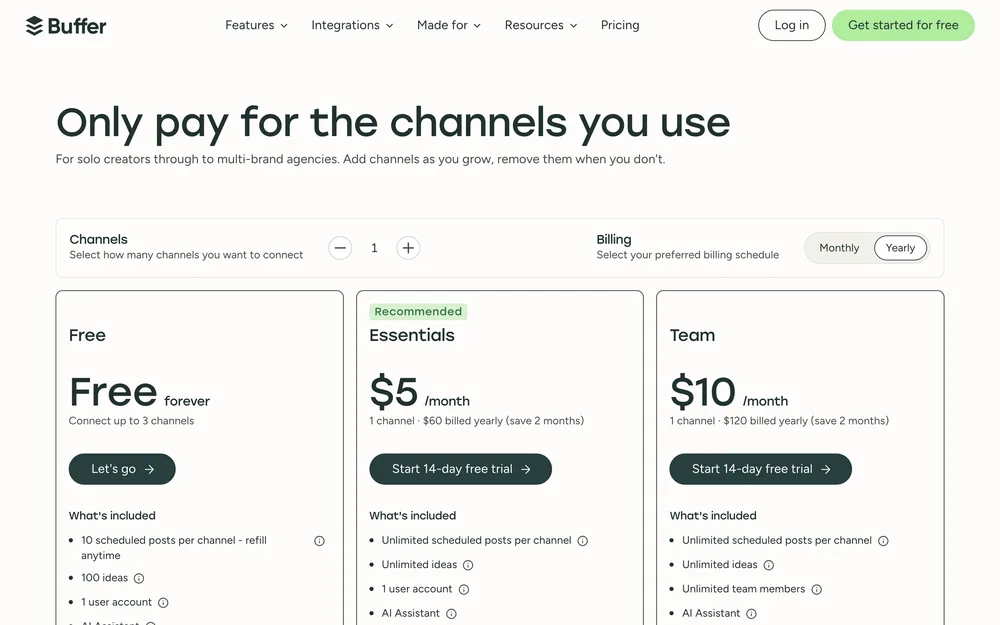
- It is here because it does not claim to be an agent: the AI Assistant drafts, repurposes and suggests, then stops, which is what most products here do once you look past the word. The AI Assistant is on every tier, the free one included. The free plan runs three channels with ten posts each and five AI reply suggestions a week, and it ships one API key with 3,000 requests a month, so you can script against it before paying. That API is why it belongs here, and it is the publishing end of the multi-platform guide.
- Biggest downside
- It decides nothing, so if autonomy is what you came for this is the wrong purchase. Per-channel pricing punishes breadth: eight channels on Essentials is $40 a month. The free tier caps you at one user and insights stop at 30 days, so there is little history to reason over.
- Pricing
- Free with 3 channels. Essentials $5 per channel per month, $60 billed yearly. Team $10 per channel, $120 billed yearly. pricing checked October 2026
- Verdict
- The right answer for most individuals, and the clearest demonstration here that assistive is not agentic.
07 Metricool
- Best for
- The level-one job: something watching the numbers so you only look when there is cause.
- Key strengths
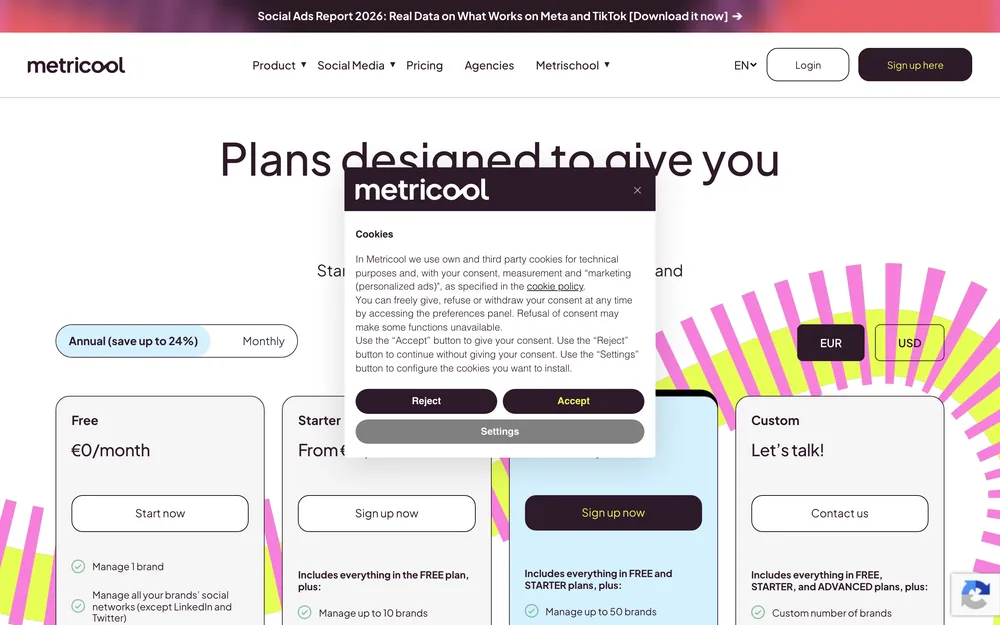
- It is built around measurement, which makes it the best feedstock here for an agent reasoning about results. The free plan covers one brand, 20 scheduled posts a month, five competitor profiles, 30 days of analytics, an AI assistant and a Metricool MCP endpoint, which nobody else here offers free. Starter begins at $20 a month billed annually for up to five brands. If the monthly deck is the thing you keep rebuilding by hand, read automated social media reports next.
- Biggest downside
- It is agent-adjacent and that is all: it tells you what changed, and nothing in it will act on a finding. The free plan also excludes LinkedIn and X, so the generous-looking tier is the one a B2B user cannot use.
- Pricing
- Free with 1 brand. Starter from $20 billed annually, $25 monthly, up to 5 brands. Advanced from $53 annually for 15 brands, $159 for 50. pricing checked October 2026
- Verdict
- Pair it with something that acts. On its own it is the cheapest way to give an agent something true to reason about.
08 Predis.ai
- Best for
- Short-form output where you need the visuals as well as the words.
- Key strengths
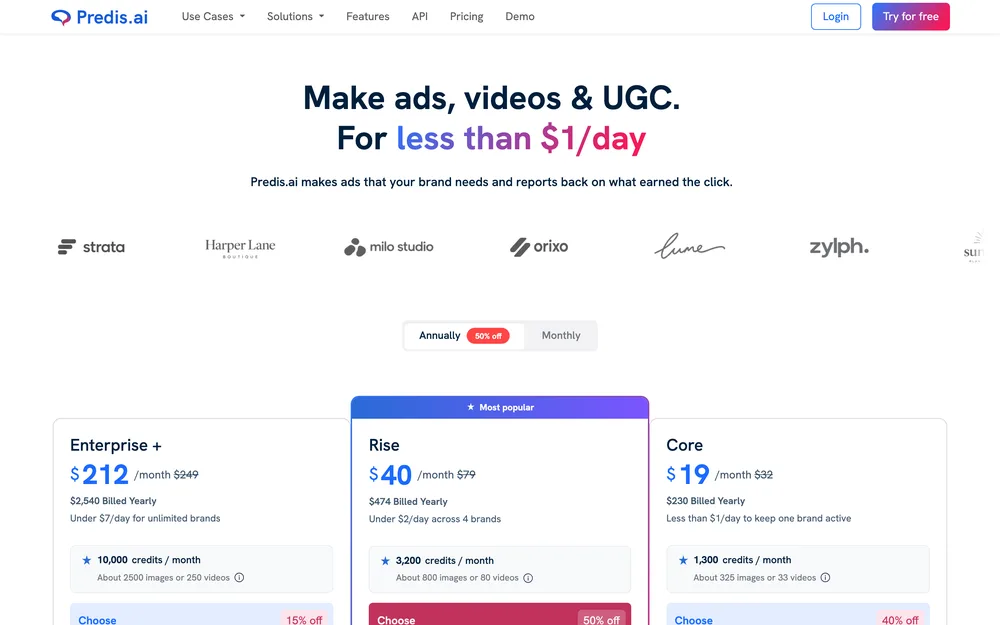
- The closest thing here to an end-to-end content agent: give it a product or a topic and it produces the concept, script, visuals, captions and hashtags, video and carousels included. Core is $19 a month with 1,300 credits, which its own page puts at roughly 325 images or 33 videos. Rise is $40 with 3,200 credits. Team members are unlimited and API access is on all three plans. For volume short-form it is a reasonable front end to TikTok auto-publishing.
- Biggest downside
- The $19 entry plan cannot publish. Its own comparison table marks Core “No Auto Posting”, so the cheapest plan generates content you then move by hand, and auto-posting starts at Rise, $40 a month. The trial is three days, a card is required and it is charged when day three ends; payments after it are non-refundable.
- Pricing
- Core $19 a month, $230 billed yearly. Rise $40, $474 yearly. Enterprise+ $212, $2,540 yearly. Three-day trial, card charged at the end. pricing checked October 2026
- Verdict
- Buy Rise or do not buy it. Core is a generator with no way out, and that $21 gap is the whole point of the product.
09 Sintra
- Best for
- Someone who wants one subscription covering a dozen business roles, with social as one of them.
- Key strengths
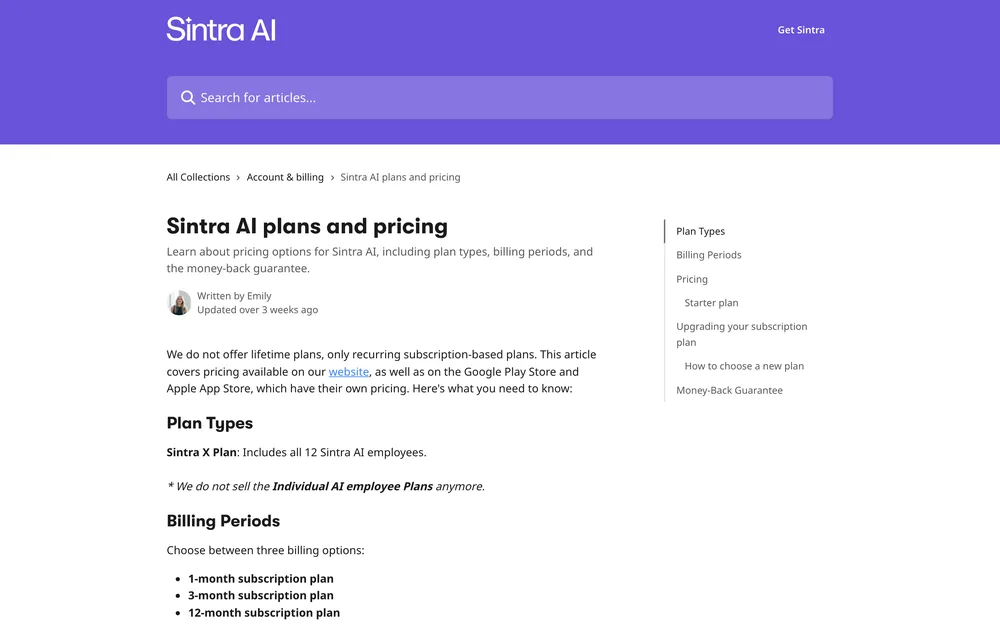
- It is the general AI-employee platform that keeps appearing for this search. Its help centre describes twelve AI employees, each focused on one business area, sharing a knowledge base that holds your documents and brand voice. Social media management is one of its example automations, and employees can post once you connect the platforms. Automations run outside chat on a schedule or an event, and complex jobs get split between employees. If consistency across that many roles is the appeal, start with training an agent on your voice.
- Biggest downside
- Neither help-centre article we read documents an approval step before an automation runs, which on this scale is the difference between level three and level four. We also could not read sintra.ai itself on 22 October 2026: the pricing page returned 403 to a direct request and a bot challenge in a browser, so every figure below comes from the help centre and nothing from its product pages. The prices there are printed as 50, 60 and 70 per cent off, which implies three different list prices rather than one, so read the saving as marketing. The 250 credits a month are shared across twelve employees.
- Pricing
- One plan, Sintra X: twelve AI employees and 250 credits a month, at $48.50 on the 1-month term, $23.60 on the 3-month and $15.60 on the 12-month, paid upfront. Individual employee plans are no longer sold. No free trial is mentioned; a 14-day money-back guarantee applies. pricing checked October 2026
- Verdict
- A business assistant with social attached, not a social agent. Buy it for the other eleven roles.
What none of them do well yet
Three things, and they are the three that make social media work.
Taste. Every product here can produce a post that is correct. None produces one that is good the way your best post last year was good, where the phrasing was slightly wrong on purpose and that is why it travelled. Generated captions regress to the mean of the category. So use these to reach a draft in 20 seconds and spend the time on the last 10 per cent. More on which ones draft best in the caption tool rankings.
Timing against a news cycle. A model can see that a term is trending. It cannot tell you whether the trend is a joke, a tragedy or a pile-on, and that difference is the difference between a good week and an apology. Queues make it worse: the post that was fine on Tuesday goes out into Thursday’s news without anybody deciding it should. Nothing here watches for that.
Knowing when to stay quiet. Nobody sells this, because silence has no feature page. An agent with a queue, a credit allowance and a schedule has every incentive to post and none to conclude that today is a day to say nothing.
The honest shape of this category in late 2026 is narrow competence plus a human who owns the judgement. An agent is very good at answering a shipping question at 2am, noticing a spike before you do, and turning a blog post into eight drafts. It is not good at deciding what your brand should sound like this month. Buy for the first list.
Choosing one
The first fork is not budget, it is where the agent lives: inside the platform, or in an assistant you already have.
Your own assistant is the agent. SchedPilot at $21 a month, for the MCP server we called, the REST API and because it holds the platform OAuth. Add Metricool if the agent should read results as well as publish, since its MCP endpoint is listed even on the free plan.
The agent lives in the platform, and replies are the job. eClincher if the volume justifies a quote-only tier, because letting each workflow choose between replying automatically and waiting for a human is the right design. Agorapulse at $79 per user if it does not, accepting one moderation rule per profile.
Somebody has to approve things. Hootsuite Advanced, and budget $399 per user rather than the $99 headline. Add Sprout Social only when a client pays for listening by name.
Your bottleneck is making things, not deciding things. Predis.ai on Rise at $40, never Core. Buffer at $5 a channel if drafts and a queue are all you need, which for most individuals they are. Sintra only if you want eleven other business roles in the same subscription.
Before you switch anything on, write down which decisions the software may make and which it must bring to you. That list survives every feature rename. The rest of the operating model is in automate social media the deliberate way.
Questions people actually ask
What is the best AI agent for social media?
Hootsuite, if you want the agent inside the platform and somebody has to approve what it does. Its review-and-approve workflow and message auto-routing sit on the Advanced plan at $399 per user per month, which is the combination that makes autonomy safe to switch on. If your own assistant is the agent, SchedPilot is the better buy at $21 a month. Pricing checked October 2026.
Is an AI agent different from a social media scheduler?
Yes. A scheduler time-shifts a post you already decided to make, while an agent decides something: what to reply, what to surface, what to publish next. The practical test is whether the product has a documented API or MCP server, because that is what lets software rather than a person drive it. Most products marketed as agents are schedulers that draft captions.
Can an AI agent run social media without supervision?
No, and nothing on this list claims to. Where unattended action exists it is narrow and pre-approved: a moderation rule that hides a comment, an inbox agent trained on your own documents, a generator set to publish on a schedule. The judgement calls, timing against a news cycle and knowing when to stay quiet, are not solved by any product we checked.
Which AI agents can reply to comments?
eClincher and Hootsuite are the clearest. eClincher's site describes AI agents that reply to messages, comments and reviews automatically or wait for human approval, and the trained auto-reply agent appears only in the Enterprise column of its pricing table. Hootsuite lists automated inbox replies from the $199 Professional plan. Agorapulse fires moderation rules on all plans, and its AI reply suggestions sit on the custom tier.
Do I need an MCP server to use my own AI assistant?
No, a documented REST API works too, but an MCP server is less work because your assistant discovers the available calls instead of you writing a wrapper. Three of these nine list one: SchedPilot, eClincher and Metricool, whose endpoint is listed even on the free plan. Buffer, Sprout Social and Predis.ai list an API instead, with Sprout's gated to its $399 tier.
How much do AI social media agents cost?
Between $5 and $399 a month, and the spread is about who decides rather than what gets published. Draft-level tools run $5 to $79: Buffer at $5 a channel, Predis.ai at $19, Agorapulse and Sprout Social at $79 per user. Approval workflows and auto-reply agents are the expensive part, at $314 to $399. SchedPilot is the outlier at $21. Pricing checked October 2026.
Are AI agents safe to give account access to?
Safer when the tool holds the platform credentials and your agent holds only one revocable key, which is how SchedPilot's API works. Ask two questions before connecting anything: can I revoke this agent's access on its own, and what can it do without asking? eClincher's own page says all users on a plan share the same API key, which answers the first question badly.
Read next
8 Best AI Tools for Social Media Captions (2026)
Eight caption tools compared on what each one documents you can store as your voice.
Best Free Social Media Automation Tools in 2026
What each free tier actually caps, which two tools lost their free plans, and the honest point where free stops being enough.
9 Best Social Media Schedulers for Agencies (2026)
Nine schedulers judged on the things agencies actually get asked for: client approvals, white-label reports, and honest seat maths.