Platform Guides
Does Scheduling TikTok Videos Affect Reach?
TikTok documents one rule that explains most zero-view scheduled posts: content from unaudited client apps is restricted to private viewing mode.
Automate distribution, assist production, keep conversation human. Scheduling, drafting, repurposing and reporting run fine without you; replies, DMs and anything carrying a judgement call do not, and the platform rules are written against automated engagement and high-frequency repetition rather than against automation itself.
Every question on this site comes back to one: which parts of your posting can run without you, and which parts break the moment you leave? That is not a matter of taste. The answer sits in the platforms’ own rules, in what their APIs will and will not publish, and in the ceilings they enforce when a queue moves faster than a person would. This page is the map.
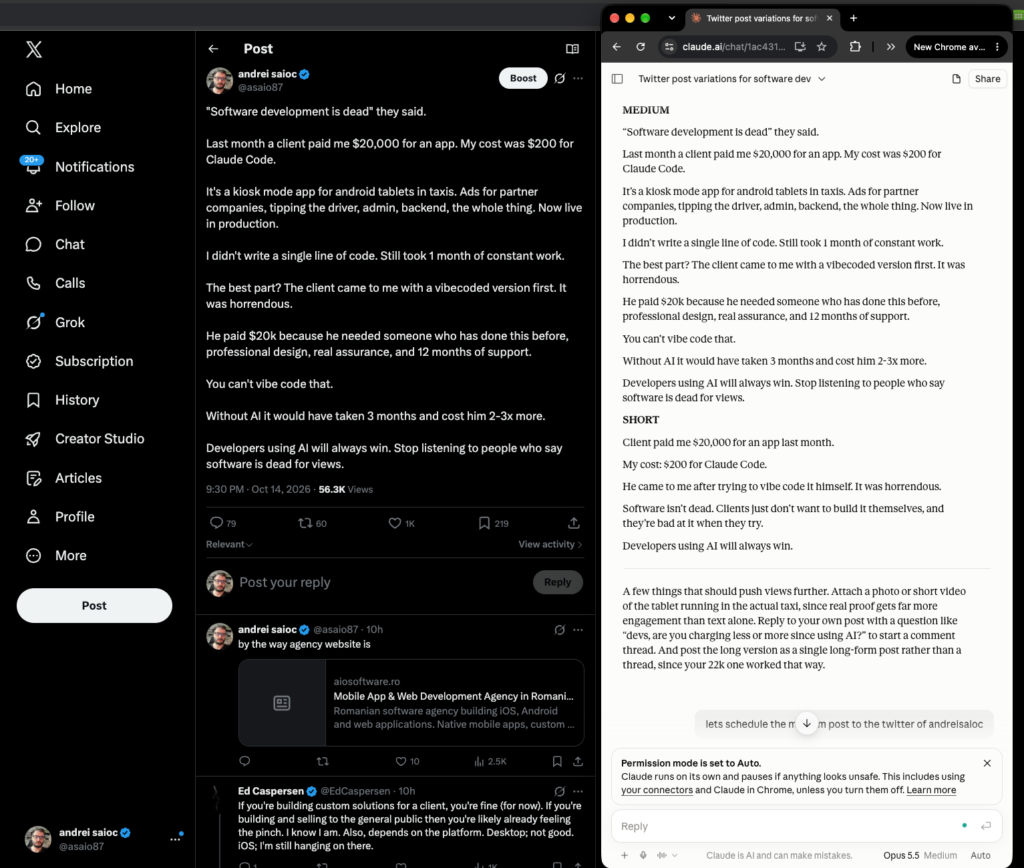
Here is one of mine. This post was drafted in Claude and published to X from the same conversation; it took 56.3K views on 14 October 2026. That is one post on one account, counted by X, not a benchmark and not a promise about yours.
Three different things get sold under one word, and the rest of this page depends on keeping them apart.
Time-shifting. You write the post, you choose the slot, a tool holds it and fires. Nothing is decided by software. This is what most people mean, and the layer with the least risk attached.
Production. The tool makes the artefact: a caption from a brief, nine posts from one article, a vertical cut from a webinar. You still approve. The work that moves off your plate is typing and reformatting, which is most of the hours.
Deciding. Software chooses the next action from a goal you set, rather than carrying out steps you specified. It reads what is queued and what performed, picks something, and calls a function. This is the only layer where judgement leaves the building.
The distinction is load-bearing because the three layers carry different risk, cost and treatment in the rulebooks. Time-shifting through an approved interface is the part the rulebooks permit. Production is cheap to review and expensive to skip. Deciding is where the approval question lives, and where a bad run is quiet rather than loud.
Most tools sit in more than one layer, which is why feature lists are poor guides. Sort any candidate by the layers it touches on your accounts before you compare a price.
The decision rule is three questions, in order. Is it repetitive enough that you resent doing it? Automate it. Does a mistake cost trust rather than time? Automate the drafting, review the output. Does it carry emotion, a judgement call, or a named person? Keep it human, permanently.
In one line: automate distribution, assist production, keep conversation. The never list falls out of it. Replies to complaints. DMs. Anything during a crisis. A founder’s opinion. Auto-likes and auto-follows, which are a different business from publishing and the thing the rules were written about. A fuller framework, with the edge cases, is in what should stay human.
Here are the rules themselves, quoted rather than summarised. Five platform rulebooks, read on their own pages in October 2026, and not one bans automation.
X is the most specific. Its automation rules say “You may not like posts or hide replies in an automated manner”, bar bulk, aggressive or indiscriminate following and unfollowing, and warn that scripting the website “may result in the permanent suspension of your account”. It bars duplicative or substantially similar posts across accounts you operate, and permits automated replies only inside a narrow consent exception: prior opt-in, one reply per interaction, an honoured opt-out, keyword-triggered replies barred outright. AI reply bots need X’s prior written approval. Automated accounts must display a label and stay connected to a human-run account.
LinkedIn’s user agreement bars bots and unauthorised automated methods used to “create, comment on, like, share or re-share posts”. Its prohibited-software page bars tools that automate activity on LinkedIn’s website. That one word is the hinge: it is why approved-API publishing survives a clause that reads, at a glance, like a ban on scheduling.
Meta does not key on automation at all. Its spam policy names “Posting, sharing, engaging with content… either manually or automatically, at very high frequencies”, and reserves restrictions for accounts acting at lower frequencies “when other indicators of spam (e.g. posting repetitive content) or signals of inauthenticity are present”. Read together, staying under a published limit is not much of a defence, because repetitive content is the ordinary output of a queue. That reading is ours, not Meta’s wording.
TikTok says it “strictly prohibit[s] automation tools, scripts, or other tricks designed to bypass our systems”, in its guidelines section on deceptive behaviour and fake engagement, and removes fake likes and followers where it detects inauthentic metrics.
Pinterest comes closest to a flat rule: “Don’t use automation that hasn’t been explicitly approved by Pinterest… You can find information on approved partner tools on our Partners website.” Worth checking before you trust a vendor’s badge: Pinterest’s Partners page names no individual tools, so the check runs through Pinterest, not the tool. The access tiers and the pacing are in the Pinterest guide.
Side by side, the shape is clear. X and LinkedIn aim at automated engagement, TikTok at tools built to get around its systems. Only two of the five can fire on ordinary scheduled publishing to a single account: Pinterest’s approved-tool requirement and Meta’s frequency clause. Publishing is the sanctioned part everywhere, and what each platform allows is worth reading before you build, not after.
Five layers. Each has one job, a tool category that does it, and a ceiling on how far to let it run unattended.
Scheduling and distribution. Job: hold a queue and publish at a chosen time across accounts. Pricing splits the category in two and decides your bill more than features do. Buffer charges per channel, at $5 each, with a free tier of three channels. Flat-rate tools price by plan instead: SchedPilot starts at $21 a month billed yearly and reaches nine networks, Instagram, X, LinkedIn, TikTok, Threads, Facebook, YouTube, Pinterest and Bluesky. Pricing checked October 2026. Run client accounts and the shape changes again: workspaces and seats become the real line items, which is what schedulers built for client work are priced around. For one or two accounts a permanent free tier may be enough, and free automation tools compared sets out what each one caps.
Creation. Job: turn a brief into a draft. SchedPilot’s caption generator advertises “captions, content ideas, carousel scripts, hooks, and hashtag suggestions”, the standard shape of this layer now. The thing to look at is not quality, it is metering. SchedPilot allocates AI by credit, 300 on Gold, 5,100 on Platinum and 10,000 on Enterprise, with none listed on the entry plan, so heavy drafting pushes you up the tiers. Output depends more on your input than on the vendor: caption tools compared covers the products, prompts with an output contract the half you control.
Repurposing. Job: one artefact into many. Automate the mechanics, review every output, because this is the layer that produces confidently wrong framing. Video clippers meter by API rate: Vizard publishes one request a minute and ten an hour on its free tier, three and twenty on Creator, ten and sixty on Business, which decides whether a batch finishes tonight. Buyers conflate video clipping with text work, and content repurposing software separates the two. For the extraction pass itself there is a playbook on how to repurpose one blog post into a month of social posts by hand.
Engagement triage. Job: sort the inbox, label it, route it, draft replies for a human to send. The tooling is further along than people assume: Vista Social’s own documentation lists 100 agent-callable tools across categories including inbox and community management. The ceiling is not capability, it is the section above. Draft in this layer. Send by hand.
Analytics and reporting. Job: pull numbers on a schedule, somewhere a person will read them. Safe to automate fully, and the one layer where the small print will surprise you. Facebook’s Page Insights needs the ANALYZE task plus read permissions, has a hundred-likes floor before it reports at all, refreshes every 24 hours, retains two years, accepts a 90-day query window, excludes Reels interactions, and carries a deprecation notice dated 15 June 2026. The useful part is an absence: nothing in that metric list keys on how a post was published. Facebook’s own analytics cannot tell you how the queue did, which is why measurement needs a method rather than a dashboard.
One question separates an agent from everything else: does it decide anything, or carry out a decision you already made? A caption box does not. Nor does a recycle queue, however autonomous it feels, because it is following a rule you wrote once. A system that reads last month’s numbers, notices a gap on Thursday, drafts something for it and queues it for your sign-off does.
The loop is observe, decide, act, then observe what the act did. Skip the last stage and you have a generator with posting rights. What matters in practice is not how clever the model is but which functions it can call on your accounts.
A worked example, because the shape matters more than the marketing. SchedPilot’s live MCP server exposes eight functions, verified by calling it on 22 October 2026: get_accounts, list_posts, create_post, upload_media, list_media, delete_post, get_analytics and create_linkedin_carousel. Read it as a boundary rather than a feature grid. There is no reply, comment or DM function, so an assistant wired to that server cannot touch the inbox however it is prompted.
Then read the one that matters most. The delete function states that it “Fails with 409 if the post has already been published on any platform”, and that “published posts cannot be deleted”. An agent can publish in a second and cannot unpublish at all. Every argument for a human gate is really that sentence: the expensive action is the irreversible one, and the one an agent is fastest at.
Which is why the gate is the step people skip and should not. It belongs between decide and act, and the reviewer has to be able to edit and reject, not only acknowledge. A screen with a single Continue button is a notification. The discipline of keeping a human in the loop is about making review survive contact with volume.
For the rest: which social AI agents actually decide sorts the products from the caption buttons, which MCP servers expose what lays the function lists side by side, there is a walkthrough for how to connect an AI assistant to your social accounts, and getting AI to sound like you is a bigger job than the wiring.
The order matters more than the tools, and most people run it backwards by starting with a purchase.
1. Audit a fortnight of what you actually posted. Count it by format and by whether anyone replied. Two weeks of real output tells you which workflow is worth building; memory tells you which you feel guilty about.
2. Pick the single highest-volume, lowest-risk workflow. One workflow, one account. Usually the evergreen queue or the blog-to-social pass, because both reuse content that passed review once.
3. Connect the accounts, and find out what your access level allows before you design anything. This is the step that catches people. Five of the nine networks we checked gate publishing behind an application or a review rather than a key. LinkedIn reaches its Posts API through the Community Management API, which it calls a vetted product with development and standard tiers. TikTok needs Direct Post configuration and an approved publishing scope, and states that “All content posted by unaudited clients will be restricted to private viewing mode”. Pinterest puts apps on a trial tier first, where pins “are only visible to their creator as Sandbox entities”. Threads will only post for app testers until you hold advanced access. YouTube’s documented route past its default quota is a compliance audit. The inverse is the riskier default: YouTube states that “Videos uploaded from unverified API projects are not restricted to private viewing mode”, and an unspecified privacy status defaults to public. All of which argues for letting a tool hold the platform connections instead of registering your own developer apps.
4. Build the queue to the platform’s ceiling, not to your calendar. Nothing breaks because you ran out of ideas. It breaks on a published limit nobody reads. Instagram’s content publishing guide states 100 API-published posts in a rolling 24 hours and says 50 in its own carousel section; its limit endpoint reports a total of 50. On that question the first-party evidence reads 50 twice and 100 once, so build to 50 and report the disagreement rather than pick a winner. A separate cap sits in its media reference, 400 containers per rolling 24 hours, and that is the one that breaks an agent pre-building a fortnight. Threads allows 250 published posts per 24 hours. Facebook schedules between 10 minutes and 30 days ahead and no further. YouTube is the sharpest trap: uploads sit in their own bucket of 100 calls a day, separate from the 10,000 units a day covering everything else, the ceiling that quietly ends a volume workflow and the reason Shorts at volume is its own problem.
5. Add the approval gate before you widen the queue. Added afterwards it is a brake on something already moving, and it never gets used. Check which plan it sits on first. SchedPilot’s homepage says nothing publishes until you approve it, while the compare-plans table on its pricing page ticks Post Approval Workflow on Enterprise only, read in the default yearly view on 22 October 2026 and confirmed in the monthly view. Both are the vendor’s own and we have not resolved them. Ask any vendor the same question at the tier you mean to buy.
6. Instrument the reporting before you expand. You are deciding whether to do more of this, and that needs a baseline taken before the change. The method, including the costs people leave out, is in measuring the ROI of social media automation.
7. Then add one workflow at a time. If a scheduler stops being enough, the next step is usually a workflow tool rather than a bigger plan, and the no-code platform comparison covers how the three price fan-out to many networks, which is where bills get strange.
Posting the identical thing everywhere. A craft failure before it is a rules failure. An Instagram carousel crops every slide to the first image’s aspect ratio. A LinkedIn carousel is a document post carrying a PDF, because LinkedIn’s own reference says organic carousel “is currently not supported”. Threads caps text at 500 characters. One payload cannot be right in four places; the fix is one source, four adaptations. Separately, and often confused with it: X’s rule on duplicative posts is about multiple accounts you operate, not the same thought appearing on Instagram and LinkedIn.
A queue nobody watches. A recycle queue will post a cheerful product line straight through a bad week, because that is what you told it to do. The fix is a weekly review and a kill switch one person can reach without the person who built it.
Automating replies. X’s consent exception technically permits automated replies, and almost nothing sold as an engagement tool fits inside it: keyword triggers are barred by name, AI reply bots need written approval. Draft replies if you like. Send them yourself.
Letting failures go unnoticed. Publishing failures are per-post and silent, and the bill is not. X’s developer pricing is per request, at $0.015 to create a post and $0.200 when it carries a link, read off X’s own pricing documentation in October 2026, so a retry loop costs about thirteen times as much on exactly the posts you most wanted published. That is what what the X API actually costs works through. The fix is alerting on failures, not a weekly glance at a calendar.
And the fear underneath all of it. No platform’s developer documentation says API-published posts rank differently from posts typed into the app. The widely repeated claim that there is no significant difference comes from a scheduling vendor’s own help page, and we found no independent research testing it either way. So do not treat it as settled, and do not plan around a penalty nobody has shown you. Scheduling and engagement automation are not the same bet, and does social media automation hurt your reach takes the two apart.
Pick the line that sounds like your week.
You post by hand every day and want your evenings back. Scheduling layer, one account, two weeks of content you already wrote. Nothing new, nothing clever, and the only step here that pays off the same week.
You have plenty of content and it only lives in one place. Start at the repurposing layer. The extraction pass is the skill; the tool only saves the formatting.
You post for other people. Approval and workspaces come before volume, and seats usually decide the plan. Build the review path first, then the queue. The operating model, rather than the shopping list, is in agency workflows at scale.
You want your assistant to run it. Ask for the function list before you ask for a demo, check there is no reply or DM call unless you want one, and check you can revoke access in one move. Then gate every action for a month on one low-stakes account.
Somebody is asking whether it worked. Take the baseline before you change anything, and count the hours as well as the subscriptions. A measurement set up after the fact measures the wrong thing.
One thing to do today. Write down the next ten decisions your posting process makes in a normal week. The ones you can state as a rule are the ones to automate this month, in the scheduling layer, with a review you have actually scheduled. The ones you cannot are the ones to keep, and they are why your accounts still sound like a person.
Nothing we could find settles it. No platform's developer documentation says API-published posts are ranked differently from posts typed into the app, and the widely repeated claim that there is no significant difference comes from a scheduling vendor's own help page rather than from research. We found no independent study either way. Keep the two questions apart: scheduling is not engagement automation, and it is the second that the rules target.
Conversation, and anything carrying a judgement call. Replies to complaints, direct messages, anything during a crisis and a founder's opinion all stay human. Auto-likes and auto-follows are a different business from publishing, and they are what the platform rules were written about: X bars liking posts and hiding replies in an automated manner, and LinkedIn bars bots used to create, comment on, like, share or re-share posts.
Not for publishing through an approved interface, which is the part the five rulebooks we read permit. X warns that scripting its website "may result in the permanent suspension of your account", and Pinterest tells you not to use automation it has not explicitly approved. Meta does not key on automation at all: its spam policy keys on frequency, and it reserves restrictions even at lower frequencies where repetitive content is present.
Less at the bottom than the tooling suggests, and it scales with channel count. Buffer charges $5 per channel and has a free tier of three channels; SchedPilot starts at $21 a month billed yearly, with a seven-day trial that asks for a card. Pricing checked October 2026. The cost people miss is per-request developer pricing: X charges $0.015 to create a post and $0.200 when it carries a link.
Only for decisions you cannot write down. A scheduler publishes what you wrote at a time you chose, while an agent picks the next action from a goal. Rules and schedulers are cheaper, predictable and auditable, and they win whenever you can list the cases. Reach for an agent when the decision space is genuinely too large to enumerate, and gate every action before you widen it.
Work back from the ceilings rather than from a target, and, so treat any specific number you are given as somebody's opinion. What platforms do publish are ceilings: Instagram's content publishing guide says 100 API-published posts in a rolling 24 hours and says 50 in its carousel section, and Threads allows 250 per 24 hours. Meta's spam policy keys on frequency, so the sustainable cadence is the one you can still review.
Draft them automatically, send them yourself. X permits automated replies only inside a narrow consent exception: prior opt-in, one reply per interaction, an honoured opt-out, and keyword-triggered replies barred outright, with AI reply bots needing its prior written approval. Almost nothing sold as an engagement tool fits inside that. LinkedIn separately bars bots used to comment on, like or share posts.
Scheduling one account's existing weekly posts. It needs no new content, no developer app of your own and no approval workflow, and a mistake shows up the same day rather than quietly. Audit a fortnight of what you actually posted, queue it, then add the approval gate before you widen the queue to a second account.
Most things sold as an AI social media agent are a scheduler with a caption button. Here is…
Platform GuidesThree routes to posting everywhere at once, a capability table per network, and the reason identical cross-posting quietly…
Workflows & PlaybooksThe workflows worth building, in the order that pays off fastest, with the failure mode for each one.
Tools & ReviewsNine tools ranked on what they actually automate, with checked October 2026 pricing and a real downside for…
TikTok documents one rule that explains most zero-view scheduled posts: content from unaudited client apps is restricted to private viewing mode.
Scheduling is the route YouTube documents, not a workaround. What costs views is a past timestamp, a byte-capped description or an upload…
Instagram's publishing docs describe no ranking difference by publishing route. The drops blamed on schedulers usually have a documented cause elsewhere.
Seven vendor-built MCP servers compared on what they actually expose, plus the widely listed ones that turn out to be community wrappers…
Nine products sold as AI agents, scored on how much they actually decide rather than how much AI is in the marketing.
Seven tools split by what they actually ingest, because buyers keep conflating video clipping with text repurposing and paying for the wrong…