7 Best Content Repurposing Tools, Compared (2026)
Part of The 9 Best Social Media Automation Tools, Prices Checked
If your source is video, a clip-finder such as OpusClip decides what to cut for you; if your source is text, you need a different category of tool entirely. Decide which input you actually have before you compare a single price.
How we picked the best content repurposing tools
Every price here was read off the vendor’s own pricing page in October 2026. Three of the seven render their prices in JavaScript and gave a plain fetch nothing, so those were read in a browser. We did not run seven subscriptions for a month: this is checked pricing, checked vendor documentation, and per-platform limits read off the networks’ own developer docs. Canva and Repurpose.io were considered and left out: we could not screenshot either pricing page without working around bot protection, which we do not do, and every tool we list carries one.
Two rules did the rest. No figure appears unless it was read this month, and every entry carries one real downside including SchedPilot, which is our own product. Transformation quality is the one thing a buyer cannot verify, so where a vendor grades its own output, as OpusClip does with “over 97%” captions, it appears below as that vendor’s claim and nothing more. Castmagic, number three below, publishes a roundup on this topic and discloses that it promotes its own product. What that does and does not buy is on our editorial policy and disclosure page.
Two different products sold as one
Two products get sold under one word, and buying the wrong one is the expensive mistake.
Clip-finders take a long video and cut it. Hand over 50 minutes of podcast and you get back nine vertical clips with burned-in captions. The input has to be video or audio: give a clip-finder a blog post and there is literally nothing for it to operate on. OpusClip, Vizard and Descript are this group, Descript being the manual one.
Text-transformers take words and reshape them. A transcript or a post goes in; threads, carousel copy, newsletter sections or an ebook come out. Castmagic and Designrr live here. Lumen5 runs the same axis in reverse, turning written posts into video.
Then a third group does neither. It moves the output. SchedPilot takes the finished clips, slides and copy and publishes them across accounts. It is here because a repurposing workflow has a publishing end, not because it transforms anything, and it gets filed under repurposing anyway.
So the best content repurposing tools for you are the ones matching the input you own, and the common failure is buying across the split: paying for clip detection when your archive is 200 blog posts, or a text transformer when you own 80 hours of webinar. Settle which job you are buying before comparing a price. If you are assembling a whole stack, the best social media automation tools is the wider shortlist, and building an automated social media operation end to end is the homepage.
The comparison table
Entry price is the cheapest paid plan, at the billing term each cell names. Annual rates sit in the entries, not here. Castmagic’s hours are a library total, not a monthly allowance.
| Tool | Group | Input | Output | Transcription | Scheduling included | Entry price |
|---|---|---|---|---|---|---|
| 1. OpusClip | Clip-finder | Long video | Vertical clips, captions burned in | Yes, captions on every plan | Yes, posting from Starter | $15/mo, free plan |
| 2. SchedPilot | Mover | Finished clips, slides, copy | Published posts across 9 networks | Not listed on its site | Yes, that is the product | $21/mo billed yearly |
| 3. Castmagic | Text-transformer | Audio or video | Transcript plus text assets | Yes, 30 hrs library total on Hobby | No | $19/mo billed annually |
| 4. Descript | Clip-finder, manual | Video or audio | Edited video and clips | Yes, all plans, 25 languages | No | $16/mo billed yearly, free plan |
| 5. Vizard | Clip-finder | Long video | Vertical clips, subtitles | Yes, auto subtitling | Yes, from Creator | $29/mo, free plan |
| 6. Lumen5 | Text-transformer, reversed | A post, script or link | Video with stock media and voiceover | Not applicable | No | $19/mo billed yearly, free plan |
| 7. Designrr | Text-transformer | Transcript, posts, documents | Ebook, PDF, flipbook | From Premium, 4 hrs/mo | No | $29/mo |
01 OpusClip
- Best for
- Long video, when you want the cutting decided for you.
- Key strengths
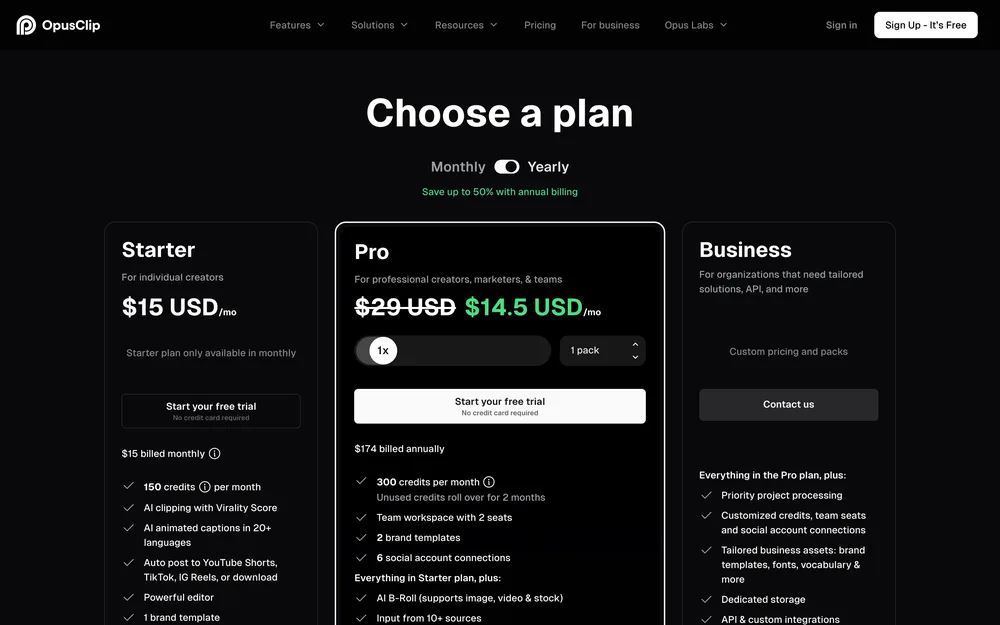
- It names real models rather than a generic AI claim. ClipAnything, which it says handles vlogs, gaming, sports and interviews rather than podcasts only, and ReframeAnything, which tracks a moving subject instead of cropping to centre. Export control matters: Starter reframes to 9:16 only, Pro adds 1:1 and 16:9. Instagram recommends 9:16 for Reels under a 300MB ceiling, so one source serving a Reel and a 16:9 cut needs Pro. Pro also lists a Scheduler API and an MCP connector, the hook if you automate YouTube Shorts rather than click through them.
- Biggest downside
- The free plan watermarks animated captions, caps export at 1080p and expires media after three days. The “over 97%” caption accuracy is its own figure, untested independently as far as we could find. Starter caps AI image B-roll at three clips a month. Our top placement rests on documented scope, not measured quality: we found no published clip-selection comparison.
- Pricing
- Free, watermarked and capped at 1080p. Starter $15/mo. Pro $29/mo, 30GB per video. Business custom. pricing checked October 2026
- Verdict
- The default when your source is video. Buy Pro once you need 16:9 too.
02 SchedPilot
- Best for
- The stage after the transformation, when the clips and slides exist and publishing them eats your week.
- Key strengths
- This is a scheduler, not a repurposing engine. It earns a place because a repurposing workflow has a publishing end, and that is where it stalls. Its site advertises a built-in editor for short clips with captions and text overlays, so light finishing happens next to the queue. And its live MCP server exposes a dedicated LinkedIn carousel call, which we confirmed by calling the server: the eight tools are get_accounts, list_posts, create_post, upload_media, list_media, delete_post, get_analytics and create_linkedin_carousel. Note the order it needs, which is upload each slide image and then call it. It publishes slides you supply and does not design them, so the design step sits upstream of it. A platform fact, not a quirk of this tool: LinkedIn’s own reference reads “Organic carousel is currently not supported” and keeps the Carousel format for sponsored content, so the organic route for a card stack is a document post carrying a PDF, which is what every tool selling LinkedIn carousel scheduling does. Nine networks, with personal profiles and company pages as separate account types, the detail that bites when you are scheduling LinkedIn carousels.
- Biggest downside
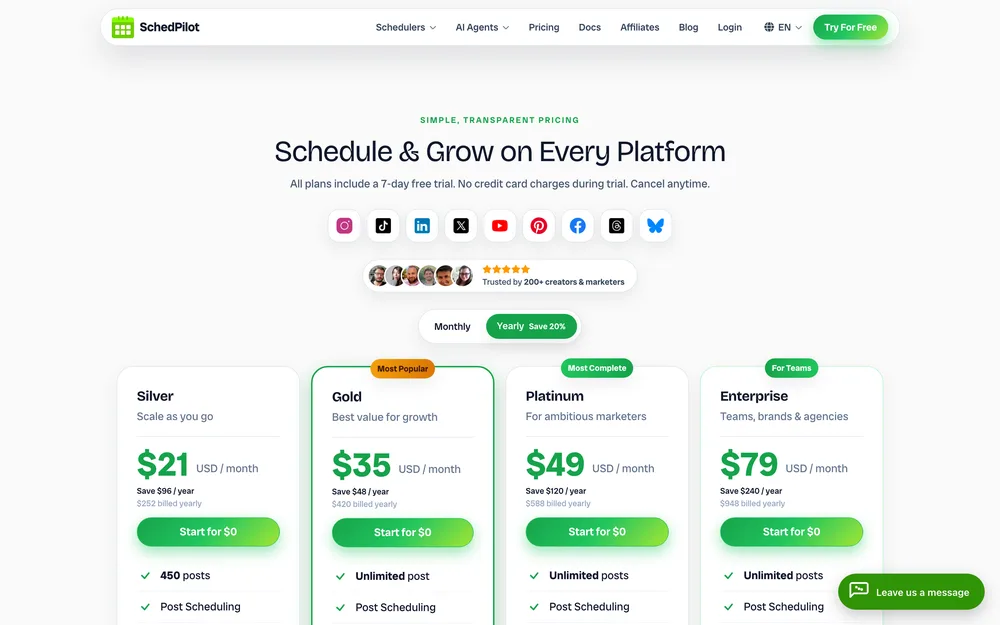
- There is no free plan: a 7-day trial, card up front, charged $0 at the start. Silver’s cap of 450 posts a month is a real ceiling once an atomised batch goes out across five accounts, and team seats are effectively Enterprise-only at $79 billed yearly, because Enterprise is the only plan stating a seat count. On repurposing specifically, its site documents no clip detection and no transcription, so the transformation happens elsewhere first.
- Pricing
- Silver $21/mo billed yearly or $29 monthly, 5 accounts, 450 posts. Gold $35 or $39, 20 accounts. Platinum $49 or $59, 40. Enterprise $79 or $99, 100 accounts, 10 seats. Lifetime $299. pricing checked October 2026
- Verdict
- Buy it for the publishing end, especially when an agent or script is driving. Not for cutting your podcast.
03 Castmagic
- Best for
- Podcasters wanting a transcript and a stack of text assets out of every episode.
- Key strengths
- Audio in, text out, and it does not pretend to be anything else. Transcription in 60-plus languages with timestamps, unlimited AI outputs and re-generations on every tier, and outputs running past 2,000 words rather than caption length. Media clipping and audiogram generation are unlimited on all three plans. Import from Zoom, Drive, RSS, YouTube, TikTok and Instagram, so an RSS feed pulls each episode in. The saved-prompt library is what makes it stick: once you have your prompt templates, this is where they live and run against every new episode.
- Biggest downside
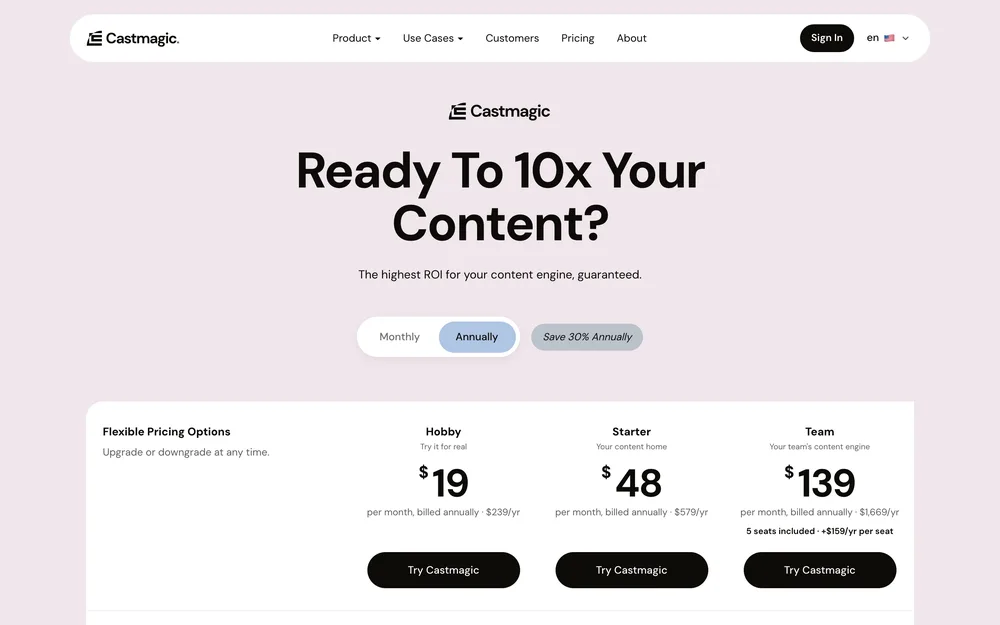
- The transcribed-hours figure is a library total, not a monthly allowance. Hobby’s 30 hours is 30 hours ever, so a weekly hour-long show exhausts it inside eight months. Its grid also contradicts itself on Team, listing maximum team size as unlimited while the price line beside it reads five seats included. API access is absent from Hobby, and the page documents no speaker diarisation.
- Pricing
- Hobby $19/mo billed annually, $239/yr, 30 hours. Starter $48/mo, $579/yr, 100 hours, API access. Team $139/mo, $1,669/yr, 400 hours. Business and Scale from $699/mo. No free plan listed. pricing checked October 2026
- Verdict
- The podcast pick. Our placement rests on documented scope, not measured output. Budget for topping up hours.
04 Descript
- Best for
- Cutting talking-head video by hand, by editing the transcript instead of a timeline.
- Key strengths
- Text-based editing is on every plan including the free one, and the way to pull a tangent out of a 40-minute recording without scrubbing a timeline: delete the sentence and the video goes with it. Transcription is included on all plans across 25 languages, and the real meter is media hours, counting anything you upload or record whether transcribed or not. For webinar footage it is the manual counterpart to the clip-finders, which is what you want when the automatic pick is wrong and you would rather choose before scheduling TikTok videos.
- Biggest downside
- It is an editor, so the work is still yours. The free plan watermarks exports, caps local export at 720p and allows one media hour a month, which one long recording exceeds. Seats on Creator and Business are billed on top of the plan price, so a three-person team is not the headline number.
- Pricing
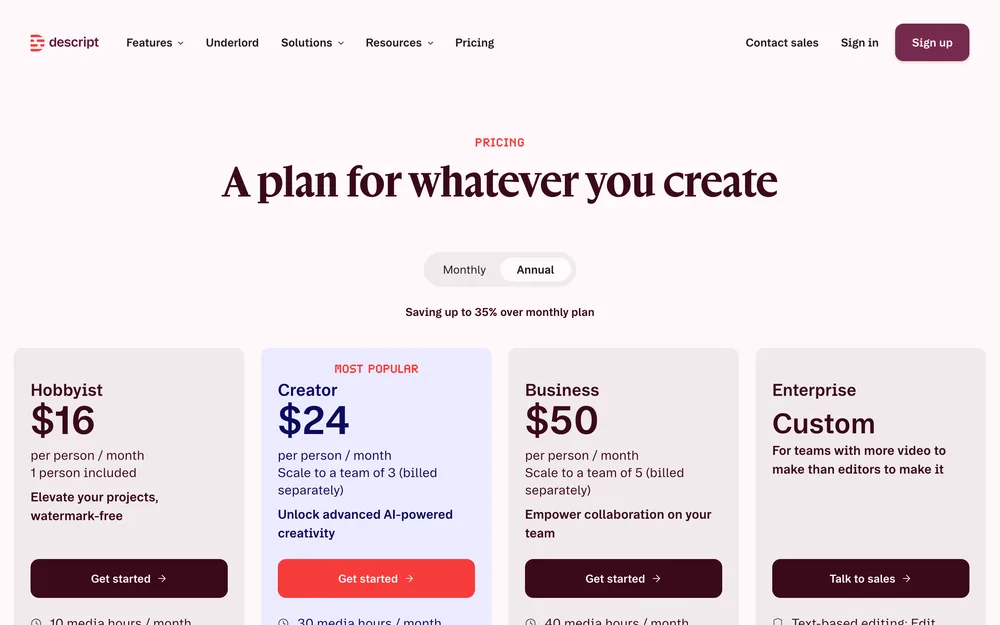
- Free, 1 media hour a month, watermarked. Hobbyist $24/mo or $16 billed yearly, 10 hours. Creator $35 or $24, 30 hours, 4K. Business $65 or $50. Enterprise custom. pricing checked October 2026
- Verdict
- Buy it as your editor, not your repurposing engine. For clips chosen for you, pair it with a clip-finder.
05 Vizard
- Best for
- Clip-finding on a smaller budget, with publishing and scheduling in the same subscription.
- Key strengths
- The same job as OpusClip, with direct publishing and scheduling from Creator up. Auto subtitling, subtitle translation, auto reframe, AI B-rolls and transcript download as TXT and SRT, the format you want when captions get rewritten elsewhere. The free tier is worth testing on: 60 credits a month, 1080p upload, full editor access, and one credit is one minute of video. If you mainly need to automate Instagram posts out of long video, this collapses two subscriptions into one.
- Biggest downside
- The free tier exports at 720p with a watermark, caps export length at ten minutes and deletes storage after three days. Its API rate limits are tight: 1 request a minute and 10 an hour on free, 3 and 20 on Creator, 10 and 60 on Business. Both paid tiers start from 600 monthly credits and cap a single upload at 600 minutes, so on the base allowance Business buys accounts and a brand kit rather than more video.
- Pricing
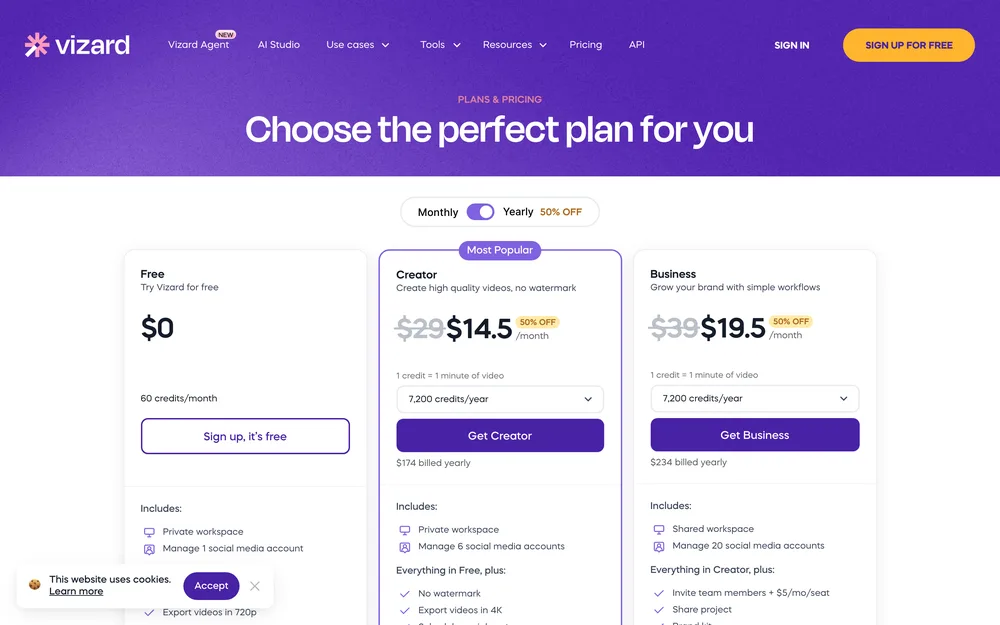
- Free, 60 credits a month, 1 account. Creator $29/mo or $174 billed yearly, 6 accounts, 4K. Business $39/mo or $234 yearly, 20 accounts, seats $5 each. pricing checked October 2026
- Verdict
- The pick among the clip-finders when you need scheduling and several accounts. Test it free first.
06 Lumen5
- Best for
- Turning written posts into video when you own text and no footage.
- Key strengths
- The only tool here running text to video rather than the other way round, which answers a question nothing else here can. Start from a link, a script or a document and it assembles a first cut with stock media, automated captions and an AI voiceover. Captions and templates are on every tier including free, and brand kits, colours and fonts arrive at Basic, so the output stops looking like a template. If you have 200 blog posts and no camera, this is your route to video, best used inside a larger plan, so read which workflows to build first before committing a budget.
- Biggest downside
- The AI budgets are annual and easy to misread: Basic gets 12 animation minutes and 240 AI voice minutes a year, Starter 24 and 720, Pro 60 and 2,160. Per year, not per month. Resolution is the other trap: Basic at $19 is still 720p, and 1080p starts at Starter for $59.
- Pricing
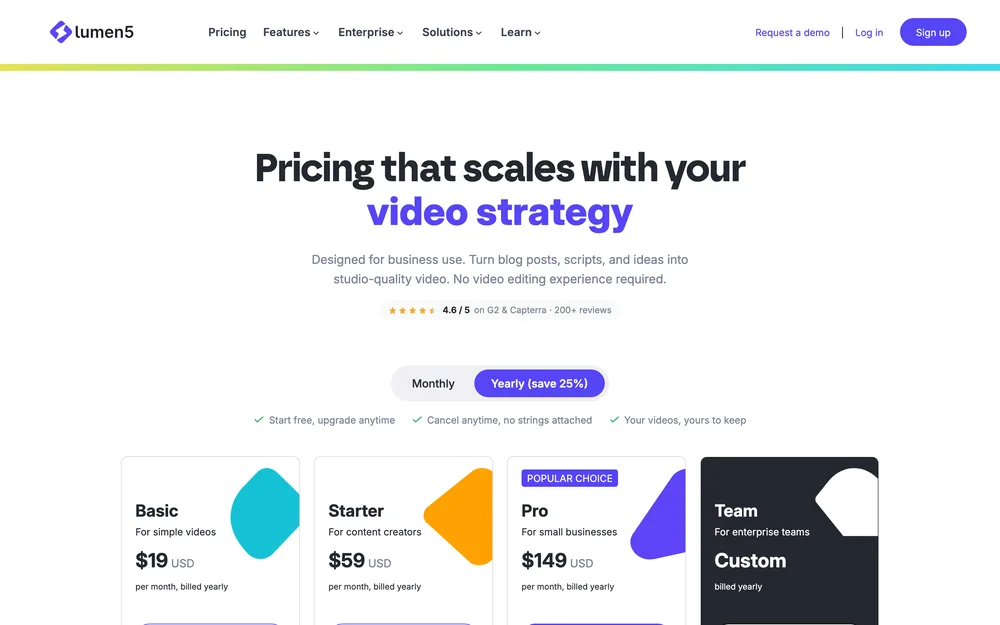
- Free, 5 videos a month, 2-minute maximum, branded outro. Basic $19/mo, unlimited videos, 720p. Starter $59/mo, 1080p. Pro $149/mo. Team custom. Every paid figure is the billed-yearly rate. pricing checked October 2026
- Verdict
- Right for a text archive and no footage, wrong for anything else. 1080p costs $59, not $19.
07 Designrr
- Best for
- Turning a transcript or a run of blog posts into an ebook rather than social posts.
- Key strengths
- The narrowest tool here, and the only one aimed at the long end of repurposing. Import from a web page, Word or Google Docs on Standard. PDF import, export to Kindle, iBooks and ePub, and a flipbook generator from any PDF arrive at Pro. Transcription appears from Premium at four hours a month, eight on Business, 25 on Agency Premium. An ebook is what you trade for an email address; a clip for attention. The short-form half of the same transcript still needs somewhere to go, and scheduling threads on X is usually where it ends up.
- Biggest downside
- Transcription, the feature that makes this a repurposing tool rather than a layout tool, only appears from Premium at $49 a month, and four hours is one weekly episode with nothing spare. Standard and Pro list no transcription hours. The pricing page shows monthly figures only, and refers to a trial without stating its length. Nothing on it describes posting or scheduling.
- Pricing
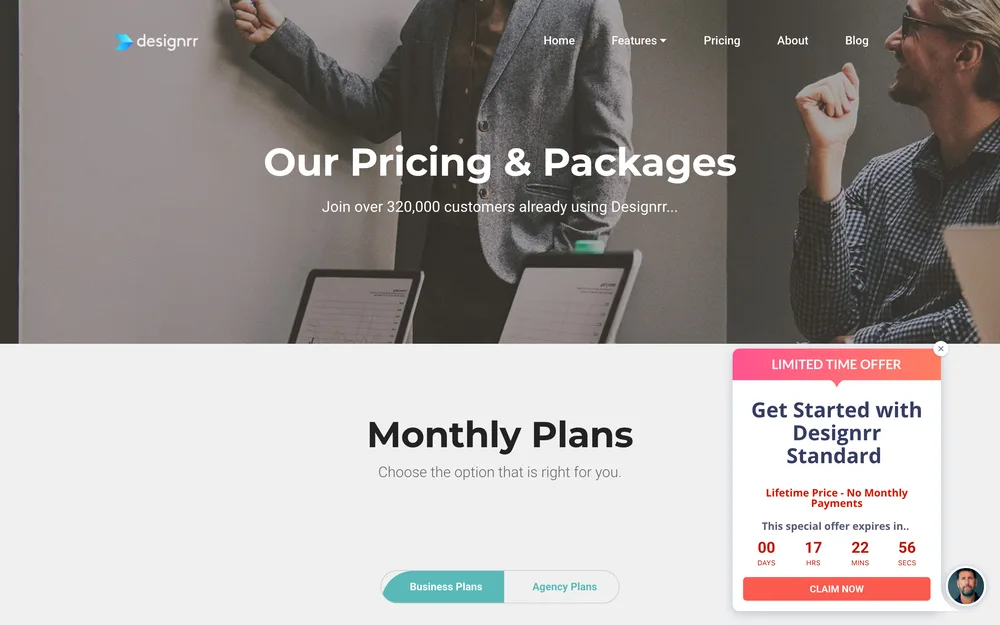
- Standard $29/mo, 1 user. Pro $39/mo, ePub and Kindle export. Premium $49/mo, 4 transcription hours. Business $99/mo, 8 hours. Agency Premium $249/mo, 25 hours. Monthly rates only. pricing checked October 2026
- Verdict
- Buy it when the lead magnet is the goal. For social posts out of a transcript, Castmagic is cheaper and better aimed.
What repurposing cannot fix
A weak source asset produces weak clips. Clip detection finds the best 40 seconds of what you recorded, and if that is someone saying “so yeah, that’s kind of the idea”, the tool did its job and you have nothing worth posting. None of these seven improves the thinking. The time saving is in production, not in deciding what to say.
Reposting the same cut everywhere fails on mechanics before it fails on taste, and the networks’ own developer docs show why. Instagram crops every carousel item to the first image’s aspect ratio and takes up to 20 items. X’s post endpoint accepts four photos, or one GIF, or one video, so a ten-slide deck is not one X post. Pinterest publishes image or video pins only, with no multi-image pin, so a deck becomes a run of single pins and Pinterest scheduling is its own decision. Threads caps a text post at 500 characters and fails at media creation above five links. Facebook’s own Pages posts guide documents no multi-image, Reels or Stories publishing. “One asset, everywhere” describes an interface, not the platforms behind it.
Volume has ceilings too, and they bite precisely when atomisation starts working. YouTube’s video insert endpoint sits in its own quota bucket at 100 calls a day, separate from the 10,000 units covering every other endpoint, so bulk Shorts uploads hit a wall rather than slowing down. Instagram documents 400 media containers per rolling 24 hours, the limit that breaks a tool pre-building a fortnight of posts, and its publishing guide states 100 API-published posts per 24 hours in one place and 50 in its carousel section, reconciling neither. TikTok restricts everything published by an unaudited client to private viewing mode.
Then captions. A transcript is not copy. Burned-in captions lifted out of a transcription read like a transcript, and the fix is a rewrite rather than a setting. If that is the part of the week that hurts, AI tools for writing captions are a different purchase. The same split applies at the publishing end: how a recycle queue works matters before you aim a pipeline at an empty calendar, and if you want software choosing what goes out, the best AI agents for social media are another category again.
Picking by what you already have
Sort by input first.
Long video, and you want the cutting decided. OpusClip at $15 for Starter, and Pro at $29 the moment you need 16:9 as well as 9:16. Vizard at $29 for clipping, scheduling and six accounts in one subscription, with a free tier giving you 60 minutes a month to judge the clip selection first.
Podcast audio. Castmagic at $19 a month billed annually, with the 30-hour library total in mind rather than the monthly allowance you assumed. Add Designrr from $49 only if the goal is an ebook rather than posts.
Written posts, no footage. Lumen5 at $19 if 720p is acceptable and $59 if not. The stills and carousel slides are a design job rather than a repurposing one, and on LinkedIn they ship as a PDF, since the organic format for a card stack is a document post.
Webinar recordings. Descript first. An hour of webinar needs a human cut before anything automatic is worth running, and transcript-based editing is how you make it without a timeline. Then point a clip-finder at the trimmed version.
Already publishing, and distribution is the chore. SchedPilot from $21 to queue and publish across nine networks, with the LinkedIn carousel call if your slides exist. That is the purchase when the job is automating posting everywhere at once rather than making the asset. OpusClip and Vizard publish their own output too; Castmagic, Descript, Lumen5 and Designrr hand you a file and stop.
None of them decides what is worth repurposing. That stays yours, and turning one post into many is the editorial half no subscription will do.
Questions people actually ask
What is the best content repurposing tool?
There is no single best one, because the category splits by input. For long video, OpusClip decides the cuts for you and starts at $15 a month. For podcast audio into text assets, Castmagic at $19 a month billed annually. For written posts into video, Lumen5. For publishing what any of them produce, SchedPilot. Buying across that split is the common and expensive mistake.
What is the difference between clipping and repurposing?
Clipping is one kind of repurposing: cutting a long video into short vertical clips with captions. Repurposing is the wider job of turning one asset into several, which includes clipping but also transcript-to-thread, post-to-video, and transcript-to-ebook. A clip-finder handed a blog post has nothing to work on, which is why the distinction decides what you should buy.
Can AI turn a blog post into social posts automatically?
Yes, text-transformers do exactly this, and a transcript or post goes in while threads, carousel copy and newsletter sections come out. Quality is the catch. Every vendor advertises strong automatic output and we found no independent test of those claims, so plan on editing. The captions in particular usually need a rewrite rather than a setting change.
How many social posts can one blog post produce?
There is no reliable number, and anyone quoting one is guessing. What is fixed is the per-platform ceiling on each output: an Instagram carousel takes up to 20 items, a Threads post caps at 500 characters, an X post accepts up to four photos, and Pinterest publishes no multi-image pin at all. Those limits decide how many usable pieces a source asset really yields.
Do repurposing tools publish as well as create?
Some do. OpusClip lists posting from its Starter plan, and Vizard includes scheduling from Creator up. Castmagic, Descript, Lumen5 and Designrr do not publish at all, so they hand you a file. If publishing is the actual bottleneck, a scheduler such as SchedPilot sits downstream of whichever tool does the transformation.
Is repurposing bad for reach if the content repeats?
No platform's developer documentation says API-published posts are ranked differently, and the claim that there is no performance difference comes from a scheduling vendor's own help page, so treat neither as settled. What is documented is conduct: X prohibits duplicative or substantially similar posts across accounts you operate, and Meta reserves restrictions for high posting frequency. Vary the cut per platform.
What is the cheapest way to repurpose video?
Free tiers, and all three here are complete enough to judge a tool on. OpusClip's free tier watermarks exports and caps them at 1080p. Vizard gives 60 credits a month, where one credit is one minute of video, at 1080p upload. Descript gives one media hour a month. All three watermark or downscale exports, so treat them as tests rather than tiers you live on. Cheapest paid entry is OpusClip Starter at $15.
Read next
The 9 Best Social Media Automation Tools, Prices Checked
Nine tools ranked on what they actually automate, with checked October 2026 pricing and a real downside for every one of them.
8 Best AI Tools for Social Media Captions (2026)
Eight caption tools compared on what each one documents you can store as your voice.
9 Best Social Media Schedulers for Agencies (2026)
Nine schedulers judged on the things agencies actually get asked for: client approvals, white-label reports, and honest seat maths.