The 9 Best Social Media Automation Tools, Prices Checked
Pillar guide The hub for Tools & Reviews
Buffer is the best default for most people and SchedPilot is the one to pick if an AI agent or script will be doing the posting. Everything above $99 a month is buying you listening and reporting, not better publishing.
How we picked and what we checked
We checked all nine of these social media automation tools the same way: every price on this page was read off the tool’s own pricing page in October 2026, not copied from another listicle. The pages ranking for this query quote prices that contradict each other, and one of them lists the same tool at two different figures.
The pricing method was identical for all nine: open the vendor’s own page, read the rendered numbers, record what each price is charged per. That last part varies, sometimes per channel, sometimes per seat, sometimes per account, sometimes per brand. Two of the nine render their prices in JavaScript, so those two were read in a browser rather than fetched. Feature claims were checked against each tool’s own documentation, not its marketing copy.
What we did not do is run nine subscriptions for a month. This is checked pricing and checked documentation, plus one MCP server we exercised ourselves. Three rules kept it honest: no figure appears unless it was read this month, every entry carries one real downside including SchedPilot, which is our own product, and nothing is claimed about a feature we could not find documented. Where a vendor’s pages disagree, the pricing page wins: it is the page that bills you.
SchedPilot, at number two, is our own product. What that does and does not buy sits on our editorial policy and disclosure page. The wider context, automating social media end to end, is on the homepage; this page is only the shortlist.
Scheduling is not automation
Time-shifting a post, writing the post and deciding what to post are three separate jobs. Almost every tool below does the first competently. Vendor listicles stop there and call all of it automation, which is why their rankings look the same.
Job one is the queue. You write ten posts on Sunday, the tool spreads them across the week and handles each platform’s upload quirks. A solved problem: Buffer does it for $5 a channel, Hootsuite for $99 a seat, and the posts land either way.
Job two is generation: turning a rough idea or a long video into something postable. Most tools bolt an AI writer onto the composer and meter it in credits. If that is the part of your week that hurts, dedicated AI caption tools and repurposing tools beat the one built into your scheduler.
Job three is the decision. Something has to choose what goes out, read the response and adjust. No tool here does that by itself. What the better ones have is a hook: a documented API or MCP server that lets a model drive the queue and read the results without you in the loop. If that sounds abstract, read what an AI agent actually is, then the agents compared on what they decide and the MCP servers for posting.
So the question is not which tool is best, it is which of the three jobs you are buying. The jobs column in the table below scores all nine on exactly that, and the price gaps stop looking arbitrary. If your problem is getting one piece of content onto six networks at once, the mechanics of cross-platform publishing matter more than any ranking.
The comparison table
Entry price means the cheapest usable paid plan, at the billed-yearly rate where the vendor advertises one. Four of these nine bill per channel, account or seat, so the headline number is not your bill. Jobs scores each tool on the three above: Q is the queue, G is generating the post, D is a documented hook that lets software decide.
| Tool | Best for | Channels at entry price | Entry price | Free tier | AI included | API or MCP | Jobs |
|---|---|---|---|---|---|---|---|
| 1. Buffer | One person, a few channels | 1 per channel paid for | $5 per channel/mo | Yes, 3 channels | Yes, on every plan | API, 3,000 requests/mo on free | Q, G, D |
| 2. SchedPilot | An agent or script posting | 5 accounts | $21/mo billed yearly | No, 7-day trial | Credits from Gold; none listed on Silver | REST API and a working MCP server | Q, G, D |
| 3. Hootsuite | Enterprise approvals | 10 accounts | $99 per user/mo | No, 14-day trial | Yes, on every plan | MCP connectors listed on every plan | Q, G, D |
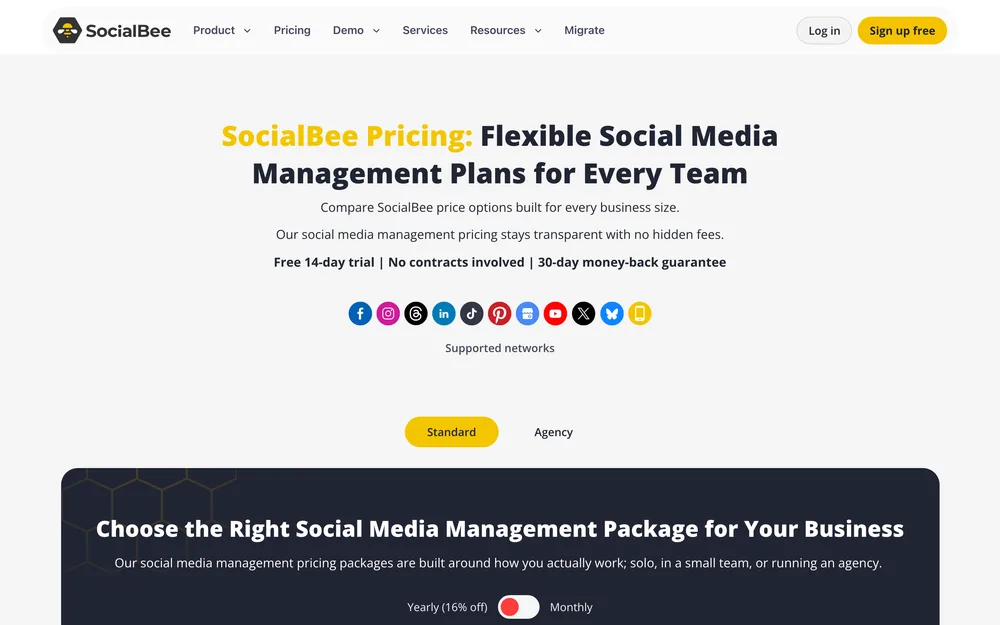
| 4. SocialBee | Evergreen recycling | 5 profiles | $24.20/mo billed yearly | No, 14-day trial | Yes, unlimited generation | Not listed; Zapier only | Q, G |
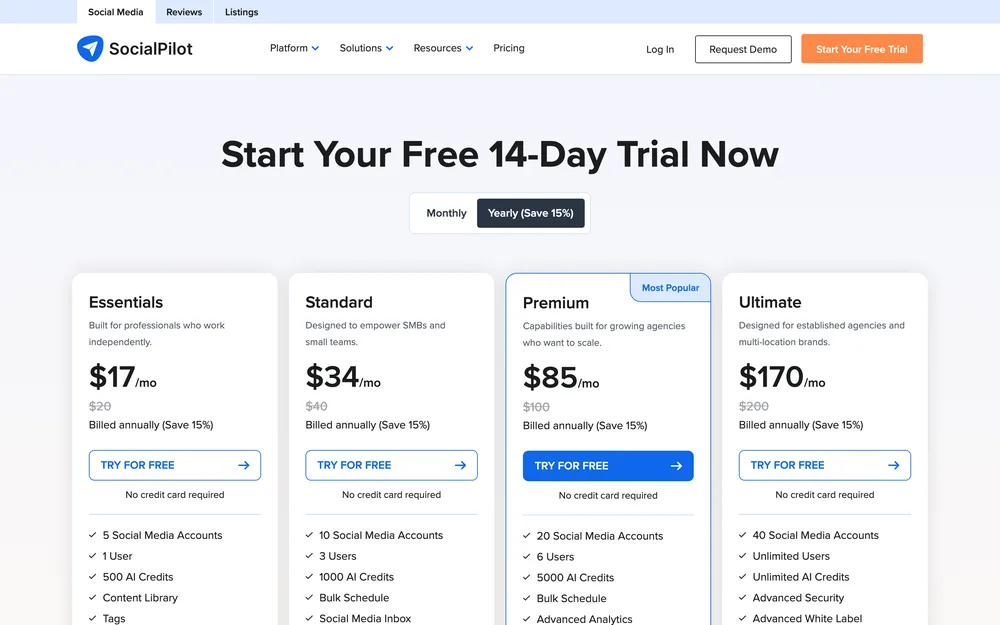
| 5. SocialPilot | Many profiles, bulk upload | 5 accounts | $17/mo billed yearly | No, 14-day trial | Yes, 500 credits | Not listed; ChatGPT integration | Q, G |
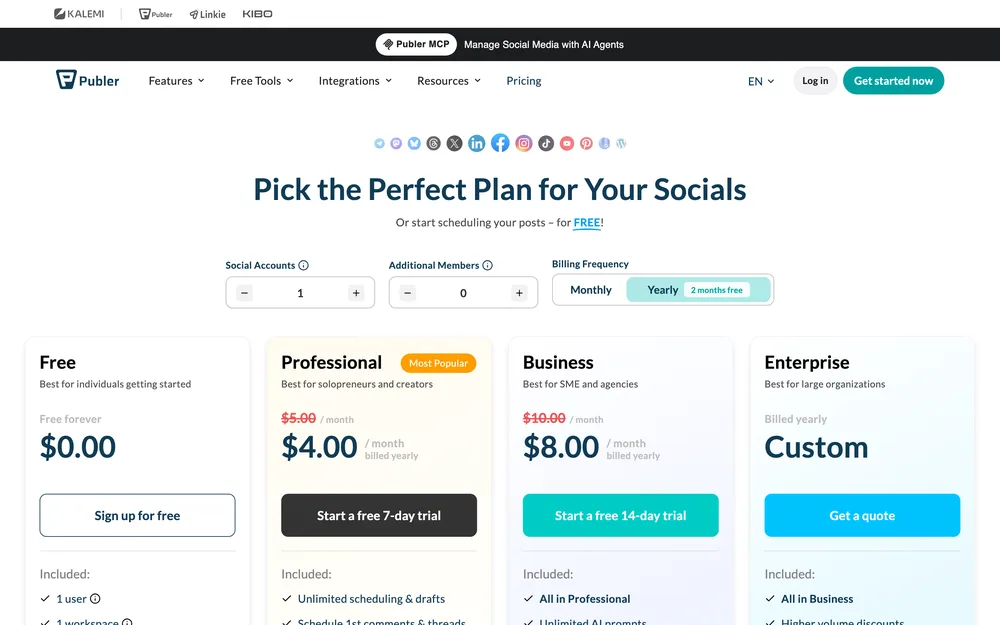
| 6. Publer | A free tier you can live on | 1 per account paid for | $4 per account/mo billed yearly | Yes, 3 accounts, no X | On Business plan | API and MCP on Business | Q, G, D on Business |
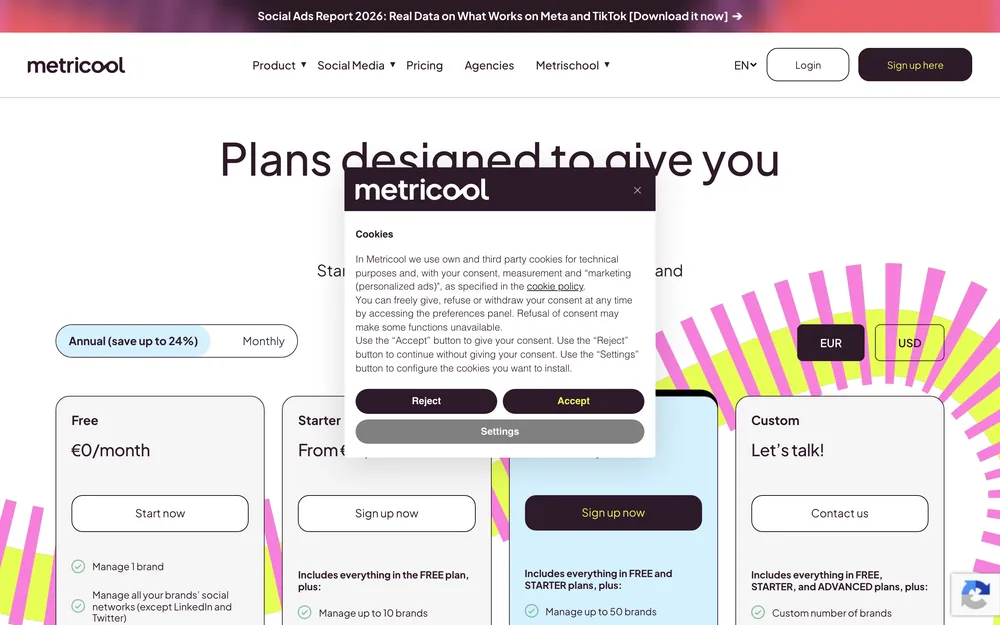
| 7. Metricool | Reporting over publishing | Up to 5 brands | $20/mo billed yearly | Yes, 1 brand, no LinkedIn or X | Yes, on free too | MCP listed, including on free | Q, G, D |
| 8. Sprout Social | Listening depth | 5 profiles | $79 per seat/mo billed yearly | No, 30-day trial | 100 agent credits per seat | API on Advanced only | Q, G, D on Advanced |
| 9. n8n | No per-seat cost, own your data | However many you wire up | 20 euro/mo billed yearly, self-host free | Self-hosted Community edition | AI and agent nodes | MCP client and server nodes | D; you build Q and G |
01 Buffer
- Best for
- One person posting to a handful of channels who wants the monthly bill to stay small and the tool to stay out of the way.
- Key strengths
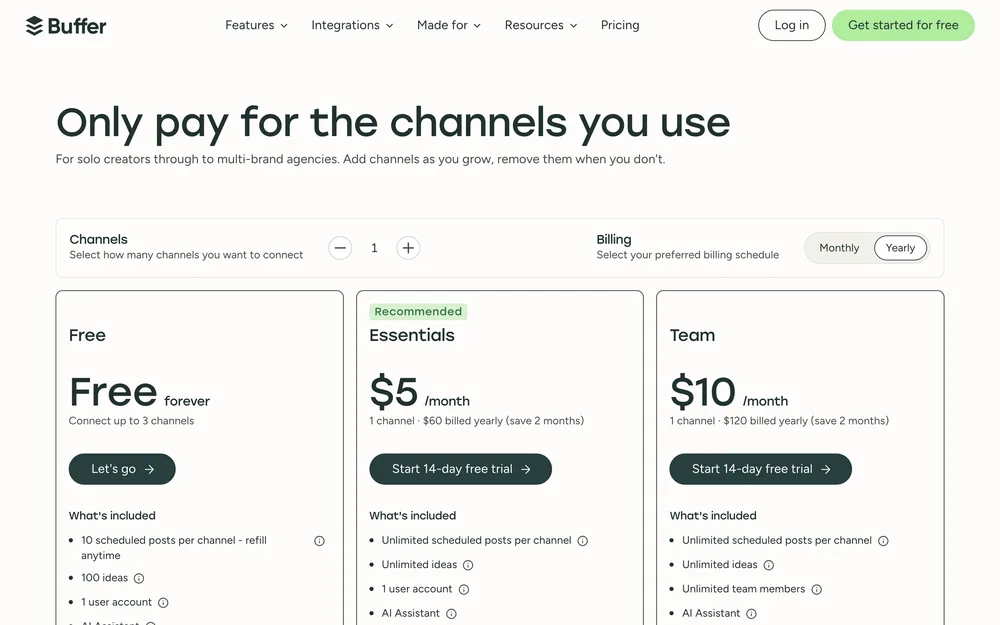
- The free plan still exists and is not a demo: three channels, ten scheduled posts per channel, 100 ideas, 30 days of insights and five AI reply suggestions a week. Essentials is $5 per channel per month, $60 billed yearly, and Team is $10 per channel. The AI Assistant is on all three tiers, free included; of the nine tools here, no other puts its AI writing on a free plan. The free plan even ships one API key and 3,000 requests a month, so you can script against it before paying. Threading works, so it is a reasonable base for X threads and the API.
- Biggest downside
- Per-channel pricing punishes breadth. Eight channels on Essentials is $40 a month, which is what SocialPilot charges for a ten-account plan with three users in it. The free tier also caps you at one user and ten queued posts per channel, so it breaks the moment a second person touches it, and insights stop at 30 days.
- Pricing
- Free with 3 channels. Essentials $5 per channel per month, $60 billed yearly. Team $10 per channel, $120 billed yearly. Channels above ten cost less each. pricing checked October 2026
- Verdict
- The default for one person with four or five channels. Stop reading unless per-channel maths or an agent is your problem.
02 SchedPilot
- Best for
- Posting when the thing doing the posting is not a human: a model, a coding assistant, or your own script.
- Key strengths
- The MCP server works. We connected to it and called it, and the eight tools it exposes are get_accounts, list_posts, create_post, upload_media, list_media, delete_post, get_analytics and create_linkedin_carousel. So an agent can build a LinkedIn carousel end to end: upload slides, call one tool. There is also a REST API at api.schedpilot.com with bearer-token auth, included on paid plans from $21 a month, and SchedPilot holds the platform OAuth, so your agent carries one key rather than nine sets of app credentials. Nine networks, with LinkedIn profiles and company pages treated separately, which matters when you automate LinkedIn posting.
- Biggest downside
- There is no free plan: a 7-day trial, card up front, charged $0 at the start. Team seats are effectively Enterprise-only, because only the $79 plan states a count, so a three-person team on Gold has none documented. Silver caps posts at 450 a month, which an agent publishing daily to five accounts will hit, and analytics depth is undocumented, with no published metric list or history window.
- Pricing
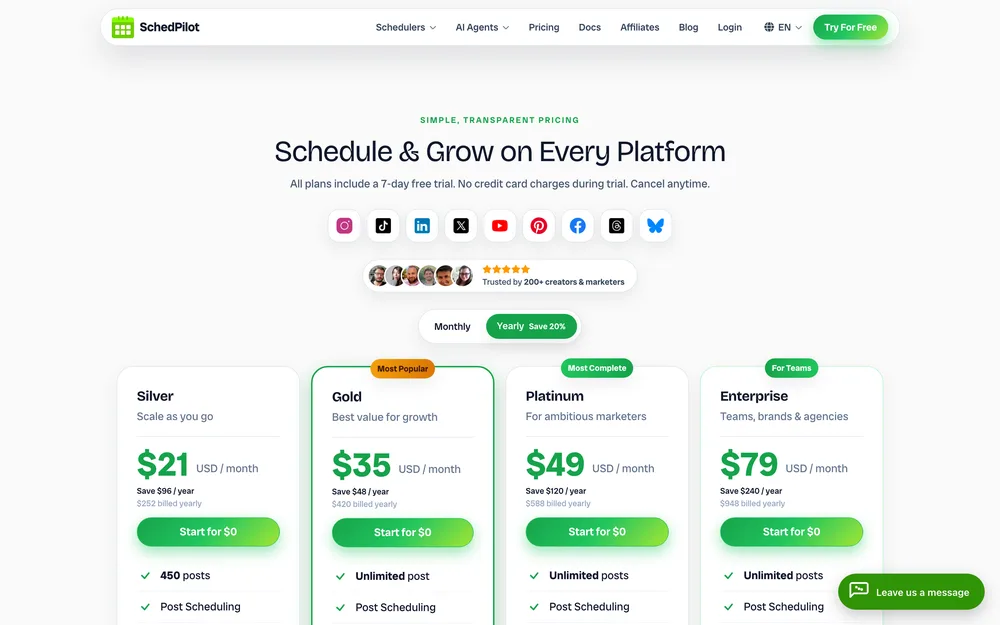
- Silver $21 billed yearly, $29 monthly, 5 accounts, 450 posts. Gold $35 or $39, 20 accounts, 300 AI credits. Platinum $49 or $59, 40 accounts. Enterprise $79 or $99, 100 accounts, 10 seats. Lifetime $299, 100 licences. pricing checked October 2026
- Verdict
- Buy it if an agent does the work. Skip it if you need a free tier or seats under $79.
03 Hootsuite
- Best for
- Teams inside larger organisations where content has to be reviewed before it ships and somebody signs off on the audit trail.
- Key strengths
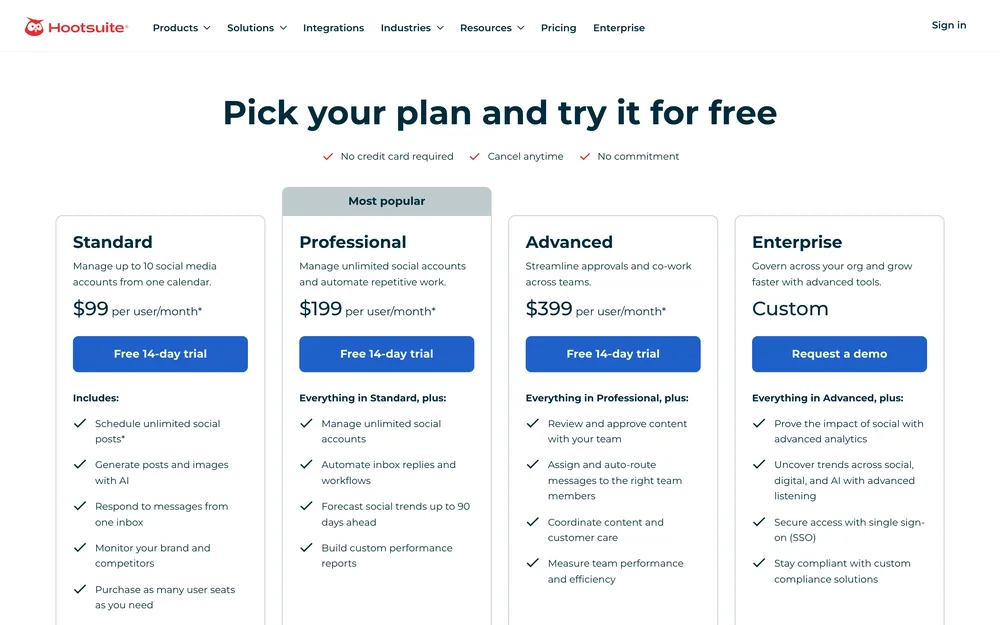
- Breadth and maturity. Standard is $99 per user per month on annual billing with ten social accounts, unlimited scheduling, a shared inbox and brand monitoring. Professional at $199 lifts the account cap, automates inbox replies and forecasts trends up to 90 days out. Advanced at $399 is where the approval workflow and message auto-routing live. Wisdom AI, which the plans page describes as an in-app assistant with MCP connectors, is listed on every plan, which is further than most incumbents have moved. The 14-day trial needs no card. Its Instagram coverage is the most complete of the incumbents if you publish Instagram posts, Reels and Stories from one calendar.
- Biggest downside
- The price is per user, so the real number is a multiple. Three people on Standard is $297 a month at annual rates, and approvals, the actual reason most teams buy Hootsuite, do not appear until Advanced at $399 per user. The trial is throttled to 10 to 20 posts a day with bulk scheduling off, so you cannot test it at the volume you would use.
- Pricing
- Standard $99 per user per month, Professional $199, Advanced $399, all on annual billing. Monthly billing exists at a higher per-user rate. pricing checked October 2026
- Verdict
- Justifiable when approvals and a single audited inbox are the requirement. Indefensible for one person with five channels.
04 SocialBee
- Best for
- Anyone with a library of posts worth showing twice, who wants the recycling to be a setting rather than a weekly chore.
- Key strengths
- Categories. You file posts by theme, set a posting pattern per category, and the queue cycles through them forever in the order you specified. Other tools bolted recycling on; this is what SocialBee is built around, and it is the cleanest version of the evergreen queue on the list. Bootstrap is $29 a month billed monthly, or $24.20 billed annually, with five profiles. Unlimited AI content generation is included from the entry plan rather than metered in credits, and the 14-day trial needs no card. It publishes to ten networks including Google Business Profile and Bluesky, and routes Facebook Groups, WhatsApp, Telegram, Mastodon and Quora through reminders instead of pretending it can auto-post them.
- Biggest downside
- No public API or MCP server appears anywhere on its own feature pages. Automation beyond the queue means Zapier, which puts a third subscription and a second failure point between you and a post. The entry plans are single-user and single-workspace: both open up at Pro, $99 a month billed monthly.
- Pricing
- Bootstrap $29 monthly or $24.20 billed annually, 5 profiles. Accelerate $49 or $40.80, 10 profiles. Pro $99 or $82.50, 25 profiles. Larger tiers run to $449 monthly or $374 annually for 150. pricing checked October 2026
- Verdict
- Pick it for evergreen recycling and nothing else. If an agent is in your plans, it is the wrong purchase.
05 SocialPilot
- Best for
- Running a lot of profiles on a small budget, especially when most of your week is uploading a spreadsheet of posts.
- Key strengths
- Value per connected account. Standard is $40 a month billed monthly or $34 annually for ten accounts, three users and 1,000 AI credits, and that is the tier where bulk upload and CSV import live. Premium at $100, or $85 annually, gets you 20 accounts, six users and unlimited client seats, which is a cheap agency setup. Extra accounts are $4 a month each and extra users $5, so it scales in small increments instead of forcing a tier jump. The 14-day trial needs no card. Coverage runs to ten networks including TikTok, so it holds up if your volume is short video and you want to automate TikTok posting across several accounts.
- Biggest downside
- Bulk upload and CSV import, the single reason to choose this tool, are not on the $20 Essentials plan. You need Standard at $40, so the advertised entry price is not the price of the feature you came for. No public API or MCP server is listed on its integrations page either, just a ChatGPT integration for drafting.
- Pricing
- Essentials $20 monthly or $17 annually, 5 accounts, no bulk scheduling. Standard $40 or $34, 10 accounts. Premium $100 or $85, 20 accounts. Ultimate $200 or $170, 40 accounts. pricing checked October 2026
- Verdict
- The best price per profile on the list once you start at Standard. Budget for $40, not $20.
06 Publer
- Best for
- Testing a real workflow at zero cost, then paying for exactly the accounts you kept.
- Key strengths
- The free plan is the widest of the paid tools’ free tiers: three social accounts, ten scheduled posts each, 25 saved drafts, one user, one workspace, plus trials of the paid features without a card. Paid pricing is per social account and low. Professional is $5 a month per account, $4 billed yearly, with unlimited scheduling, threads and first comments. Business is $10 per account, $8 billed yearly, adding unlimited AI prompts, analytics, competitor analysis, spintax recycling and Publer’s API and MCP. Platform coverage is the widest here: Mastodon, Telegram, Google Business Profile, WordPress, and Facebook Profiles, Pages, Locations and Groups, which makes it the pragmatic pick for Facebook Pages and Groups.
- Biggest downside
- The free tier cannot connect X at all, and it keeps published post history for 24 hours, so there is no record to look back at. The API and MCP sit on Business at $10 per account: ten accounts is $100 a month, no longer the cheap option.
- Pricing
- Free forever with 3 accounts, no X. Professional $5 per account per month, $4 billed yearly. Business $10 per account, $8 billed yearly. Trials run 7 days on Professional, 14 on Business. pricing checked October 2026
- Verdict
- Start here to prove the workflow before spending. Watch the per-account maths past six or seven accounts.
07 Metricool
- Best for
- Work where the reporting is the deliverable and publishing is the side effect, which is most client work.
- Key strengths
- It is built around the numbers rather than the calendar. The free plan covers one brand, 20 scheduled posts a month, five competitor profiles, 30 days of analytics, an AI assistant and a Metricool MCP endpoint, which is a lot for nothing. Starter begins at $20 a month billed annually, $25 monthly, for up to five brands, and $36 annually for ten. Advanced starts at $53 annually for 15 brands and runs to $159 for 50. Competitor and ad-account data sit in the same view as organic, so one export answers a client question instead of three. If a monthly deck is what you keep rebuilding by hand, pair it with scheduled reports.
- Biggest downside
- The free plan excludes LinkedIn and X, which between them are most of B2B, so the generous-looking tier is the one a B2B user cannot use. The pricing page also states no user or seat count on any plan, so team size is a sales conversation rather than a number.
- Pricing
- Free with 1 brand. Starter from $20 billed annually, $25 monthly, up to 5 brands, $36 annually for 10. Advanced from $53 annually for 15 brands, $85 for 25, $159 for 50. pricing checked October 2026
- Verdict
- The cheapest credible reporting layer here, and a fair free trial if your channels are not LinkedIn and X.
08 Sprout Social
- Best for
- Agencies and in-house teams whose clients ask for listening, sentiment and board-ready reporting, and can be billed for it.
- Key strengths
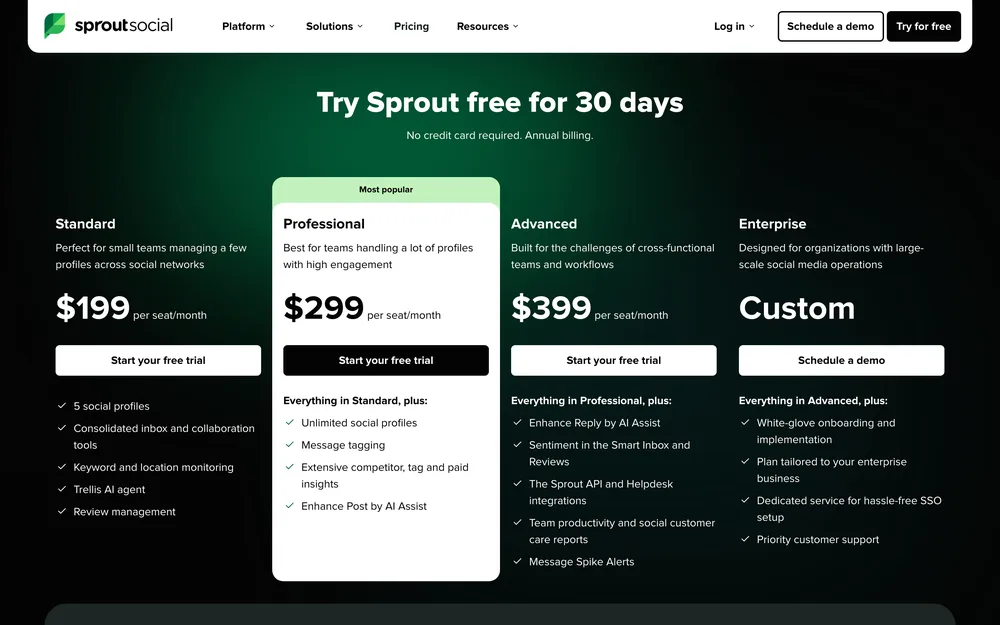
- Depth nobody else here matches. Standard is $199 per seat per month with five profiles, a consolidated inbox, keyword and location monitoring and review management. Professional at $299 lifts the profile cap and adds competitor, tag and paid insights. Advanced at $399 brings sentiment in the inbox, spike alerts and the Sprout API. A newer Essentials tier sits underneath at $79 per seat billed yearly, $99 monthly, with five profiles. Every plan includes 100 AI agent credits per seat per month, and the trial is 30 days with no card, the longest here. It is the tool clients recognise by name when you are running many clients at once.
- Biggest downside
- Everything is per seat and the good parts are gated high. The API only arrives on Advanced at $399 per seat per month, and premium analytics and listening are separate paid add-ons on top of that. Standard at $199 a seat gives you five profiles, the same count as Essentials at $79, so you are paying $120 a seat for features rather than capacity.
- Pricing
- Essentials $79 per seat per month billed yearly, $99 monthly. Standard $199 per seat, Professional $299, Advanced $399. Premium Analytics and Listening are add-ons from Standard up. pricing checked October 2026
- Verdict
- Worth it only when a client pays for listening by name. As a publishing tool it is five times the price of better publishers.
09 n8n
- Best for
- Anyone who wants no per-seat cost, their data on their own server, and posting wired into the rest of their stack.
- Key strengths
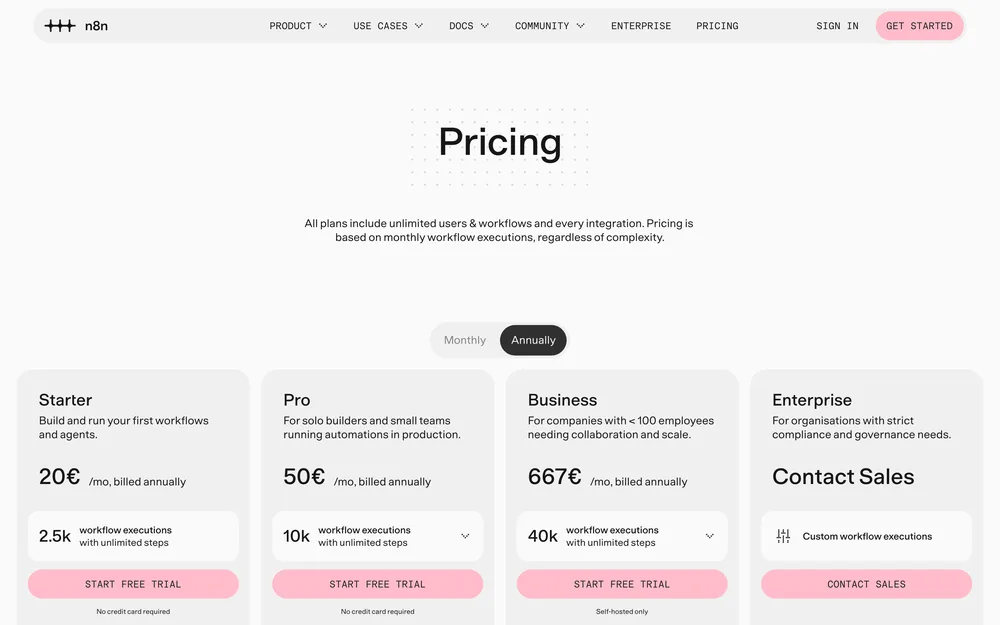
- It is not a scheduler, which is the point. You build the flow: a trigger, a model call, an approval step if you want one, then a platform API at the end. n8n’s own docs list a self-hosted Community edition as free, so the only cost is the box it runs on. Every plan includes unlimited users and unlimited workflows, because the meter is executions, not people. MCP client and server nodes and an AI agent node are included from the entry tier up, so it can drive other tools or be driven by a model. If you are still deciding on the plumbing, read picking a workflow platform first.
- Biggest downside
- There is no calendar, no queue, no approval screen and no social inbox, so you build and then maintain all of it. Every platform you add brings its own auth, upload rules and breaking changes to fix on a Saturday. The meter is executions, so a retry loop costs real money.
- Pricing
- Self-hosted Community edition listed as free in n8n’s own docs. Cloud Starter 20 euro a month billed annually, 2,500 executions. Pro 50 euro, 10,000. Business 667 euro, self-hosted only, 40,000. pricing checked October 2026
- Verdict
- Correct for engineers and anyone with a data-residency requirement. Everyone else should buy a scheduler and spend the time on content.
How to choose in under five minutes
Answer three questions: how many channels, who is doing the posting, and what you can spend.
A human is posting, one to five channels, under $25 a month. Buffer at $5 a channel, or Publer free if three accounts covers you and you do not need X. If analytics is the actual job, Metricool at $20 billed annually gives five brands and a reporting layer the schedulers lack.
A human is posting, six to twenty channels. SocialPilot Standard at $34 billed annually: ten accounts, three users and the CSV upload on one plan. Go to SocialBee instead only if your content is a recycling library rather than a weekly calendar.
An agent or a script is posting. SchedPilot, for the verified MCP server and the $21 entry price, if you can live without a free tier. n8n if you want no per-seat cost and your own server, and accept that you now maintain the integrations.
A team is posting and somebody has to approve it. Hootsuite Advanced if approvals are a compliance requirement and the per-seat cost is signed off, Sprout Social only when a client pays for listening by name. Read the agency schedulers comparison first: the per-seat maths reorders everything past three people.
You are reselling this to clients. Price white label separately, because it is where these tools diverge most. SocialPilot includes unlimited client seats on its $85 Premium tier, while Sprout Social puts premium analytics and listening behind paid add-ons on top of a per-seat bill. Check that before the channel count.
Budget is zero. Publer’s free plan carries the widest network list, Buffer’s the longest queue history, and Metricool’s is the only one that reports. None will hold a business for long, and the free tiers worth using covers where each one breaks.
One last thing: above about $99 a month you are buying listening and reporting, not better publishing. The posts go out the same. Pick the cheapest social media automation tool that does your job, and put the saved money into the content.
Questions people actually ask
What is the best social media automation tool overall?
Buffer, for most people. It is $5 per channel per month, the AI assistant is included on every tier including the free one, and three channels cost nothing at all. It loses only on breadth: once you connect eight or more channels the per-channel maths beats you, and SocialPilot or SchedPilot works out cheaper. Pricing checked October 2026.
Is there a genuinely free social media automation tool?
Yes, three of them. Buffer's free plan runs three channels with ten scheduled posts each. Publer's runs three accounts but cannot connect X and keeps post history for only 24 hours. Metricool's covers one brand and 20 posts a month but excludes LinkedIn and X. Everything else on this list is a timed trial, not a free plan.
What is the difference between a scheduler and an automation tool?
A scheduler time-shifts a post you already wrote, while an automation tool also generates the post or decides what to post. Nearly every product sold as automation only does the first job. The practical test is whether it has an API or an MCP server, because that is what lets software, rather than you, drive it.
Which tool is best if an AI agent is doing the posting?
SchedPilot. Its MCP server is live and exposes eight tools: get_accounts, list_posts, create_post, upload_media, list_media, delete_post, get_analytics and create_linkedin_carousel. There is also a REST API with bearer-token auth from $21 a month, and SchedPilot holds the platform OAuth so your agent only ever carries one key. Hootsuite's Wisdom AI is listed with MCP connectors on every plan, at $99 per user per month.
Do these tools post to Instagram automatically, or just remind you?
They post automatically on every tool we checked. Feed posts, carousels and Reels publish through Instagram's official API, with no phone notification step; we confirmed that on SocialBee, Publer and SchedPilot, and the rest publish through the same API. The reminder route still exists for what the platforms do not expose to third parties, most commonly Facebook Groups.
How much should social media automation cost per month?
Between $5 and $40 for one person, and $34 to $100 for a small team running ten or twenty accounts. Above roughly $99 a month you are paying for listening, sentiment and reporting rather than better publishing. Per-seat pricing is what breaks budgets: Hootsuite and Sprout Social both charge per user, so three people multiply the bill.
Can one tool handle every platform?
No. Coverage clusters around the same nine or ten networks and the gaps differ by tool. SchedPilot covers nine and has no Google Business Profile or Mastodon, while Publer and SocialBee add Google Business Profile, Telegram and Mastodon. Check your own channel list against each pricing page before paying, because the missing network is usually the one you needed.
Read next
Best Free Social Media Automation Tools in 2026
What each free tier actually caps, which two tools lost their free plans, and the honest point where free stops being enough.
7 Best Content Repurposing Tools, Compared (2026)
Seven tools split by what they actually ingest, because buyers keep conflating video clipping with text repurposing and paying for the wrong…
9 Best AI Agents for Social Media, Scored on What They Decide
Nine products sold as AI agents, scored on how much they actually decide rather than how much AI is in the marketing.